Sv Themes

🌗 sv-themes
SSR-safe Svelte 5 theme management library with advanced features like tab sync, FOUC prevention, scoped overrides, and more.


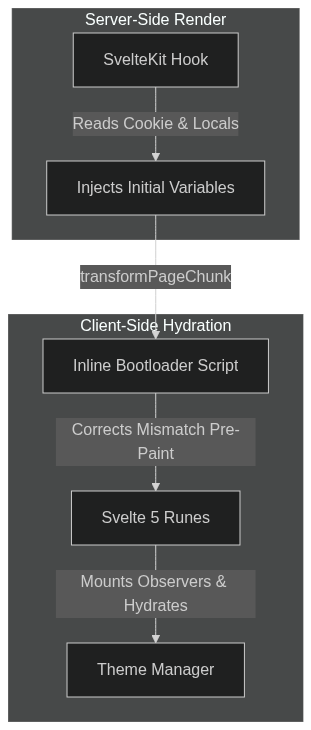
A type-safe theme management library designed for Svelte 5 and SvelteKit. Rather than basic class toggling, sv-themes coordinates states across the SvelteKit server lifecycle and Svelte 5 client-side components to resolve common theme challenges like handling system preferences, storage fallbacks, cross-tab syncing, and scoped theme overrides without hydration mismatches or layout flickers.
Features
- SSR-Safe: Prevents initial light/dark flashes (FOUC) by synchronizing theme attributes with the server and injecting an inline head bootloader.
- Svelte 5 Runes: Built natively with Svelte 5 runes.
- Scoped Theme Overrides: Declare forced themes in nested routes with priority matching, child locks, and automated unmount cleanup.
- Tab Synchronization: Listens to global storage events to instantly align multiple open browser tabs.
- Robust Persistence: Coordinates fallback strategies across cookies,
localStorage, andsessionStorage. - Comprehensive Testing: Over 95% test coverage, covering all error paths and edge cases.
🏗️ Architecture
📦 Installation
# npm
npm install sv-themes

# pnpm
pnpm add sv-themes

# yarn
yarn add sv-themes

# bun
bun add sv-themes
🛠️ Defining Themes
Before initializing the manager, define your themes using the createThemes helper. This utility maps an array of theme configurations into a strongly typed ThemeRecord.
import { createThemes, type Theme } from "sv-themes";

export const APP_THEMES = createThemes([
    { id: "light", type: "light", color: "#fff" },
    { id: "dark", type: "dark", color: "#000" },
    { id: "nature", type: "light", className: "theme-nature", color: "var(--nature, green)" }
]);
⚠️ Warning: Theme Order & System Fallbacks: The order of themes in the array defines their priority within their respective type. If system themes are enabled but explicit
mappingsare omitted, the first theme of type"light"and the first theme of type"dark"are automatically selected as the fallback targets for system preference resolution.
💡 Tip: Flexible Color Values: The
colorproperty supports standard CSS names (e.g.,green), HEX codes (e.g.,#fff), and CSS custom properties (variables) with optional fallbacks (e.g.,var(--nature, green)).
💡 Tip: Automatic
<meta name="color-scheme">Resolution: IfuseColorSchemeis enabled, the library automatically manages the<meta name="color-scheme">element. Its content resolves to"light dark","dark light","light", or"dark"depending on the types of your registered themes and the type of the first theme in your config. This prevents unstyled UI flashes (such as scrollbars) instantly on load.
Types
export interface Theme {
    id: string;
    className?: string;
    type: "light" | "dark";
    color?: string;
}

export type ThemeRecord<Keys extends string = string> = Record<Keys, Readonly<Theme>>;
⚠️ Warning: Duplicate Theme IDs: If multiple themes share the same
idwithincreateThemes, the last theme in the array will overwrite the previous ones.
🚀 Quick Start
📝 Note: Looking for an example? You can find a fully configured SvelteKit implementation in the apps/demo directory of the repository.
1. Create Theme Manager (src/lib/theme-manager.svelte.ts)
Set up your canonical theme configurations and instantiate the manager.
import { createAppThemeManager, DEFAULT_THEMES } from "sv-themes";

export const { themeManager, registerThemeManager } = createAppThemeManager({
    themes: DEFAULT_THEMES,
    initialTheme: "light",
    systemThemes: {
        kind: "enabled",
    },
    useSystemTheme: true,
}).match(
    (result) => result,
    (errors) => {
        // Throw returned errors with their messages
        throw new Error(JSON.stringify(errors.map((error) => error.message)));
    },
);
2. Server Middleware (src/hooks.server.ts)
Intercept SvelteKit’s SSR lifecycle to inject resolved state directly into the HTML markup.
import { createThemeHandle } from "sv-themes/kit";
import { themeManager } from "$lib/theme-manager.svelte"; // Your shared manager instance

export const handle = createThemeHandle(themeManager);
💡 Tip: CSP Nonce Support: If your application enforces a Content Security Policy (CSP), you can provide a script nonce to the inline head bootloader in two ways:
- Set
event.locals.svThemesScriptNoncein SvelteKit"s request cycle.- Pass it directly as the second parameter:
createThemeHandle(themeManager, cspNonce).To support the
event.localsapproach with TypeScript, extend SvelteKit's global interface in yoursrc/app.d.ts:declare global { namespace App { interface Locals { svThemesScriptNonce?: string; } } }
3. Root Layout Orchestration (src/routes/+layout.svelte)
Mount the manager to handle client-side hydration, media listeners, and tab sync.
<script lang="ts">
    import { registerThemeManager } from "$lib/theme-manager.svelte";

    let { children } = $props();

    // Bootstraps runtime effects and event listeners
    registerThemeManager();
</script>

{@render children()}
4. Toggle Component
Update your Svelte state directly.
<script lang="ts">
    import { themeManager } from "$lib/theme-manager.svelte";
</script>

<button onclick={() => themeManager.setTheme("light")}>Light</button>
<button onclick={() => themeManager.setTheme("dark")}>Dark</button>
<button onclick={() => themeManager.setTheme("system")}>System</button>

<p>Theme: {themeManager.resolvedTheme}</p>
5. Svelte Actions
Quickly bind elements to theme events with built-in accessibility (ARIA) attributes:
<script lang="ts">
    import { themeSelector } from "sv-themes";
    import { themeManager } from "$lib/theme-manager.svelte";
</script>

<button use:themeSelector={{ theme: "dark" }}>
    Light
</button>

<button use:themeSelector={{ themeManager /* For type-safe themes */, theme: "dark" }}>
    Dark
</button>

<button use:themeSelector={{ theme: "system", onError: (error: ThemeManagerError) => { /* Handle error */ } }}>
    System
</button>
📖 API Reference
ThemeManager<Themes> Interface
The object returned by the createThemeManager factory. Properties marked with Rune are reactive under Svelte 5 and can be read directly in Svelte components to trigger reactive UI updates.
| Property | Type | Access | Description |
|---|---|---|---|
themes |
Themes |
Readonly | The canonical record of registered theme configurations. |
themeIds |
(keyof Themes)[] |
Readonly | An array of all registered theme IDs. |
systemThemes |
SystemThemes<Themes> |
Readonly / Getter | The active system theme configuration, containing the mapped system themes and a reactive getter for the current OS systemTheme ("light" | "dark" | undefined). |
useSystemTheme |
boolean |
Rune (Getter) | Indicates whether the user's preference is set to follow system OS settings. |
resolvedUseSystemTheme |
boolean |
Rune (Getter) | Derived state determining if system preferences are actively shaping the current theme (resolves to true if system themes are enabled and either no theme is forced with useSystemTheme active, or forcedTheme is set to "system"). |
hasLightTheme |
boolean |
Readonly | Boolean flag indicating if any registered theme is of type "light". |
hasDarkTheme |
boolean |
Readonly | Boolean flag indicating if any registered theme is of type "dark". |
initialTheme |
keyof Themes |
Readonly | The default theme ID specified during configuration. |
resolvedTheme |
keyof Themes |
Rune (Getter) | Derived state containing the active computed theme ID (Priority: Forced > System OS > Selected). |
selectedTheme |
keyof Themes |
Rune (Getter) | The currently active user-selected theme ID (ignoring any temporary forced states). |
isForcedThemeLocked |
boolean |
Rune (Getter/Setter) | Flag indicating if a layout has locked the forced state against deeper nested overrides. |
forcedTheme |
keyof Themes | "system" | undefined |
Rune (Getter) | The current temporary forced theme ID, if set. |
useColorScheme |
boolean |
Readonly | If active, synchronizes the CSS color-scheme rule on the root element. It also automatically manages the <meta name="color-scheme"> HTML element, dynamically resolving its content to 'light dark', 'dark light', 'light', or 'dark' based on the types and order of your registered themes. |
useThemeColor |
boolean |
Readonly | If active, dynamically updates <meta name="theme-color"> using theme colors. |
isThemeForcedAttribute |
string | undefined |
Readonly | Attribute set on <html> when a forced theme is active. |
isSystemThemeAttribute |
string | undefined |
Readonly | Attribute set on <html> when system preference is active. |
storage |
StorageOptions | undefined |
Readonly | Persistence configuration detailing storage methods, keys, and cookie configurations. |
enableTabSync |
boolean |
Readonly | Whether cross-tab synchronization via storage events is active. |
attributes |
ThemeAttribute[] |
Readonly | Array of HTML attributes (e.g., 'class', 'data-theme') to manipulate on the target element. |
enableLogging |
boolean |
Readonly | Whether to log to console. |
Public Methods
/**
 * Sets the active user theme preference.
 * Triggers events, runs validations, and persists the result to your enabled storage methods.
 */
setTheme(
    theme: keyof Themes | "system",
    config?: ThemeUpdateConfig
): ResultAsync<void, ThemeManagerError>;

/**
 * Declares a temporary forced theme override.
 * If shouldLock is set to true, it locks the layout hierarchy against deeper sub-route overrides.
 */
setForcedTheme(
    theme?: keyof Themes | "system",
    shouldLock?: boolean
): ResultAsync<void, ThemeManagerError>;

/**
 * Configures the user's persistent preference to follow system OS theme changes.
 */
setUseSystemTheme(
    useSystemTheme: boolean,
    config?: ThemeUpdateConfig
): ResultAsync<void, ThemeManagerError>;

/**
 * Sets the user's persistent manual theme preference.
 * This updates `selectedTheme` in the background without affecting an active `forcedTheme` override.
 */
setSelectedTheme(
    theme: keyof Themes,
    config?: ThemeUpdateConfig
): ResultAsync<void, ThemeManagerError>;

/**
 * Registers an event listener on the theme transition lifecycle.
 * Returns an unsubscription/cleanup function.
 */
on<Event extends keyof ThemeManagerEvents<Themes>>(
    event: Event,
    handler: Listener<ThemeManagerEvents<Themes>[Event]>
): () => void;
createAppThemeManager<Themes>(config)
An all-in-one helper designed specifically for SvelteKit and Svelte 5 applications. It wraps both the manager instantiation, context getter, and DOM/Context registration.
import { createAppThemeManager, DEFAULT_THEMES } from "sv-themes";

export const { themeManager, getThemeManager, registerThemeManager } = createAppThemeManager({
    themes: DEFAULT_THEMES,
    initialTheme: "light",
    systemThemes: {
        kind: "enabled",
    },
    useSystemTheme: true,
}).match(
    (result) => result,
    (errors) => {
        // Throw returned errors with their messages
        throw new Error(JSON.stringify(errors.map((error) => error.message)));
    },
);
⚠️ Warning: Collision:
registerThemeManagerruns checks to prevent collisions. It will refuse to register and return aThemeManagerErrorif:
AlreadyRegistered: Another theme manager is already registered upstream in Svelte's context hierarchy. Ensure you only callregisterThemeManageronce at your root layout level.
Configuration Options (ThemeManagerConfig<Themes>)
| Property | Type | Default | Description |
|---|---|---|---|
themes |
Themes |
Required | The record of registered theme objects of type ThemesRecord. |
initialTheme |
keyof Themes |
Required | The fallback/default theme ID to fall back on during initialization. |
systemThemes |
SystemThemesConfig<Themes> | undefined |
{ kind: "disabled" } |
Setup indicating if system themes are "disabled" or "enabled". The mappings field is a Partial<Record<SystemTheme, keyof Themes>> and automatically resolves to the first registered light and dark themes in your themes record if omitted. |
useSystemTheme |
boolean | undefined |
true |
Tracks whether the user preference is set to follow the OS. |
forcedTheme |
keyof Themes | "system" | undefined |
undefined |
The initial forced theme value, if any. |
isForcedThemeLocked |
boolean | undefined |
false |
Initial locked state of forced themes. |
useColorScheme |
boolean | undefined |
true |
If active, synchronizes the CSS color-scheme rule on the root element. It also automatically manages the <meta name="color-scheme"> HTML element, dynamically resolving its content to 'light dark', 'dark light', 'light', or 'dark' based on the types and order of your registered themes. |
useThemeColor |
boolean | undefined |
true |
Dynamically updates <meta name="theme-color"> using theme colors. |
isThemeForcedAttribute |
string | undefined |
"data-is-theme-forced" |
Attribute name set on <html> when a forced theme is active. |
isSystemThemeAttribute |
string | undefined |
"data-is-system-theme" |
Attribute name set on <html> when system theme is active. |
storage |
StorageOptions | undefined |
See below | Configuration details for storage syncing and persistence. |
enableTabSync |
boolean | undefined |
true |
Active state of cross-tab synchronization. Requires either "localStorage" or "sessionStorage" in storage methods. |
attributes |
ThemeAttribute[] | undefined |
["class", "data-theme"] |
Array of DOM targets to manipulate on the root. |
enableLogging |
boolean | undefined |
process.env.NODE_ENV !== "production" |
Whether to log to console. |
Storage Defaults
If the storage configuration is omitted, it defaults to:
{
  methods: ["cookie", "localStorage"],
  key: "theme",
  cookie: {
    name: "theme",
  }
}
🛡️ Runtime Validations & Safety
createAppThemeManager runs rigorous defensive validations to protect your application state from becoming poisoned. It will refuse to initialize and return a ThemeManagerError array if any of the following conditions are met.
Error id |
Additional Fields | Default message |
Description / Cause |
|---|---|---|---|
NoThemes |
None | "At least one theme is required." |
Returned if the themes configuration object has no keys. |
DuplicateTheme |
theme: string |
"Duplicate theme: {theme}" |
Returned if multiple configured themes share the same ID. |
ThemeNotFound |
theme: string |
"Theme '{theme}' not found." |
Passed when requesting a theme ID that is not registered. |
InvalidId |
theme: string |
"Theme id '{theme}' is invalid. The id 'system' is reserved." |
Returned if a theme configuration uses "system" or an empty string as its ID. |
SystemThemesDisabled |
None | "System themes are disabled." |
Triggered if an operation attempts system theme logic when system mapping is disabled. |
SystemThemeUnassigned |
systemTheme: SystemTheme |
"System theme '{systemTheme}' has no valid assigned theme." |
Returned if system themes are "enabled" but lack a valid fallback or configured theme mapping for "light" or "dark". |
SystemThemeInvalidType |
systemTheme: SystemTheme |
"System theme '{systemTheme}' needs to be assigned to a theme with type '{systemTheme}'." |
Fired when a system theme maps to an ID whose theme type does not match its target OS type. |
ForcedThemeLocked |
None | "Forced theme is locked." |
Fired if a nested layout has locked the active forced state and another forced transition is attempted. |
ForcedThemeActive |
None | "A forced theme is currently active." |
Returned when a standard theme change is blocked because an active forced theme override is currently in effect. |
TabSyncStorageMethodsIncompatible |
None | "Tab sync requires at least one of the following storage methods: localStorage, sessionStorage" |
Fired when tab synchronization is active but no matching client-side storage methods are configured. |
Cancelled |
None | "The operation has been cancelled." |
Returned when a transition is cancelled by a registered listener (via beforeChange or select). |
AlreadyRegistered |
None | "A theme manager has already been registered." |
Returned by registerThemeManager if another theme manager context is already registered upstream. |
NotRegistered |
None | "No theme manager has been registered." |
Returned by getThemeManager context lookup if no manager has been registered in Svelte's context tree. |
🔒 Scoped Theme Overrides
Forced themes can be set for individual pages or layouts. Layout overrides automatically propagate to all nested children.
<script lang="ts">
    import { ForceTheme } from "sv-themes";
</script>

<ForceTheme forcedTheme="dark" priority={0} overrideChildren={false}>
    <!-- Children -->
</ForceTheme>

<!-- OR -->

<ForceTheme forcedTheme="light" priority={0} overrideChildren={false} />
<p>Uses light theme</p>
| Prop | Type | Default | Description |
|---|---|---|---|
forcedTheme |
keyof Themes | "system" |
undefined |
The theme to force for this layout/page tree. |
priority |
number |
0 |
Higher priorities override lower priorities. |
overrideChildren |
boolean |
false |
If true, blocks downstream child components from changing the theme. |
📝 Note: Support for individual component scoped overrides is planned for a future version. As of right now, forced themes apply to the entire page.
🔬 Lifecycle Events
sv-themes exposes type-safe events for integration, allowing you to run animations, track analytics, or cancel transitions entirely:
const unsubscribe = themeManager.on("beforeChange", async (event) => {
    // Cancel the transition if a condition is met
    if (event.to === "premium-theme" && !userIsPremium) {
        event.preventDefault();
    }
});

themeManager.on("afterChange", (event) => {
    analytics.track("Theme Switched", { from: event.from, to: event.to });
});
Event Registry (ThemeManagerEvents<Themes>)
| Event Name | Payload Type | Description |
|---|---|---|
beforeChange |
BeforeThemeChangeEvent<Themes> |
Fired immediately before a theme transition begins. It is fully cancellable. |
afterChange |
AfterThemeChangeEvent<Themes> |
Fired immediately after a theme transition finishes and has been persisted. |
select |
ThemeSelectEvent<Themes> |
Fired immediately after a user theme preference is selected, prior to the transition lifecycle and DOM application. |
systemChange |
SystemThemeChangeEvent<Themes> |
Fired when the operating system's theme preference changes. |
forced |
ForcedThemeEvent<Themes> |
Fired when a temporary theme override is applied. |
unforced |
UnforcedThemeEvent |
Fired when an active forced theme override is cleared. |
Event Payloads
BeforeThemeChangeEvent<Themes>
Extends ThemeChangeEvent. Passed to beforeChange listeners.
from:keyof Themes | "system"- The active resolved theme before the transition.to:keyof Themes | "system"- The requested target theme.preventDefault():() => void- Call this method to cancel the theme change.defaultPrevented:boolean- Indicates whether any active listener has cancelled the transition.
AfterThemeChangeEvent<Themes>
Passed to afterChange listeners.
from:keyof Themes | "system"- The previous resolved theme.to:keyof Themes | "system"- The newly applied theme.
ThemeSelectEvent<Themes>
Extends ThemeChangeEvent. Passed to select listeners.
from:keyof Themes | "system"- The active selected theme before the transition.to:keyof Themes | "system"- The requested selected theme.preventDefault():() => void- Call this method to cancel the theme change.defaultPrevented:boolean- Indicates whether any active listener has cancelled the transition.
Passed toSystemThemeChangeEvent<Themes>systemChangelisteners.systemTheme:SystemTheme("light" | "dark") - The raw OS-level color scheme preference.resolvedSystemTheme:keyof Themes- The corresponding app theme ID mapped to this OS state.
ForcedThemeEvent<Themes>
Passed to forced listeners.
theme:keyof Themes | "system"- The specific theme that was temporarily forced.
UnforcedThemeEvent
Passed to unforced listeners. An empty non-nullable object NonNullable<unknown> representing a clear signal.
License
This project is licensed under the MIT License.
