Qr

Yopem QR
An open-source, modern, full-featured QR code management platform built with SvelteKit. Create, customize, scan, and manage QR codes with an intuitive interface and powerful features. Perfect for developers, marketers, and anyone needing dynamic QR code solutions with analytics and customization.
Features
QR Code Generation
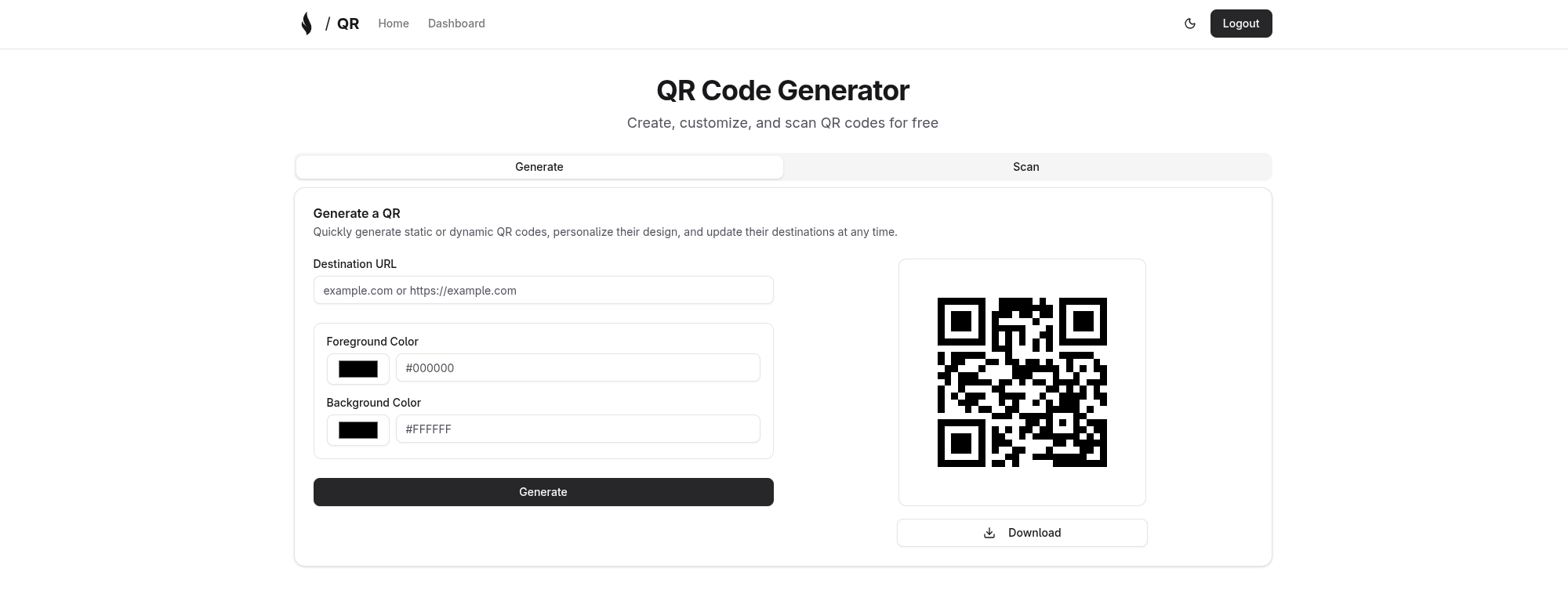
Create static and dynamic QR codes with custom URLs and content. Generate unlimited QR codes for links, text, contacts, WiFi credentials, and more.
Visual Customization
Personalize QR codes with custom colors, patterns, corner styles, and designs. Make your QR codes match your brand identity with powerful customization options.
QR Code Scanning
Scan QR codes via camera or upload images for instant decoding. Built-in scanner works seamlessly on desktop and mobile devices.
User Authentication
Secure login with OpenAuth for personalized QR code management. Each user has their own private collection of QR codes.
Dashboard Management
View, edit, delete, and organize your QR codes in one place. Powerful dashboard with filtering, sorting, and search capabilities.
Bulk Operations
Select and manage multiple QR codes at once. Perform actions like delete, export, or update on multiple QR codes simultaneously.
Short Links
Automatic short URL generation for dynamic QR codes. Track clicks and analytics for your dynamic QR codes.
Responsive Design
Seamless experience across desktop and mobile devices. Fully responsive interface optimized for all screen sizes.
Tech Stack
- Runtime: Bun
- Framework: SvelteKit 2 with Svelte 5 (runes)
- Language: TypeScript
- UI: Tailwind CSS
- Database: PostgreSQL with Drizzle ORM
- Build Tool: Vite
- Authentication: OpenAuth
Prerequisites
For Local Development
- Bun 1.3 or higher
- PostgreSQL database
- Git
- OpenAuth Issuer - Required for authentication (setup guide)
Installation
Local Development Setup
Clone the repository
git clone https://github.com/yopem/qr.git
cd qr
Install dependencies
bun installSet up environment variables
Copy the example environment file and configure it:
cp .env.example .envEdit
.envand configure the required variables (see Environment Variables section below).Run database migrations
bun run db:generate && bun run db:migrateStart the development server
bun run devAccess the application
Open your browser and navigate to http://localhost:5173
Environment Variables
Required Variables
| Variable | Description | Example |
|---|---|---|
DATABASE_URL |
PostgreSQL connection string | postgresql://user:password@localhost:5432/yopem_qr |
AUTH_ISSUER |
OpenAuth issuer URL (see OpenAuth Setup below) | https://auth.example.com |
OpenAuth Setup
Yopem QR uses OpenAuth for authentication. You need to set up an OpenAuth issuer to handle user authentication.
Setting Up Your Issuer
Follow the official guide: Visit OpenAuth Issuer Documentation for detailed setup instructions
Deploy your issuer: You can deploy an OpenAuth issuer using:
- Your own server
- Serverless platforms (AWS Lambda, Cloudflare Workers, etc.)
- Container platforms (Docker, Kubernetes)
Configure the
AUTH_ISSUERvariable: Once your issuer is running, set theAUTH_ISSUERenvironment variable to your issuer's URL:AUTH_ISSUER=https://your-issuer-domain.comImportant: Without a properly configured OpenAuth issuer, the application will not be able to authenticate users and login functionality will not work.
Quick Start for Development
For local development, you can run an OpenAuth issuer locally. Refer to the OpenAuth documentation for local setup instructions.
For a complete list of environment variables, see .env.example.
Usage
Access the application at
http://localhost:5173Create an account or log in using the authentication system
Create your first QR code:
- Click the "Generate QR Code" button
- Enter your URL or content
- Customize colors, patterns, and corner styles
- Download or save your QR code
Scan QR codes:
- Navigate to the scanner page
- Allow camera access or upload an image
- View decoded content instantly
Manage your QR codes:
- View all your QR codes in the dashboard
- Edit, delete, or duplicate QR codes
- Use bulk operations to manage multiple codes at once
Track analytics for your dynamic QR codes and monitor usage
Available Commands
| Command | Description |
|---|---|
bun dev |
Start development server |
bun run build |
Build for production |
bun run preview |
Preview production build |
bun run check |
Run type checking with svelte-check |
bun run lint |
Run ESLint |
bun run format:check |
Check code formatting with Prettier |
bun run format:write |
Format code with Prettier |
bun run db:studio |
Open Drizzle Studio (database GUI) |
bun run db:push |
Push schema changes to database |
bun run db:generate |
Generate new migration |
bun run db:migrate |
Run databse migrations |
bun run db:pull |
Pull schema from database |
Development
Code Quality
This project uses automated code quality tools. Before committing changes, ensure:
# Run linter
bun run lint

# Run type checking
bun run check

# Check formatting
bun run format:check
License
This project is licensed under the AGPL-3.0-or-later license. This is a copyleft license that requires any derivative works to be distributed under the same license terms.
