Auto Import Relative Path

Auto Import Relative Path






Never type an import path again.
Angular · React · Vue · Svelte · Astro · JS · TS · CSS · SCSS · HTML · Markdown
Drag a file or press a key — the right import lands in your editor. Path, syntax, and placement handled automatically.
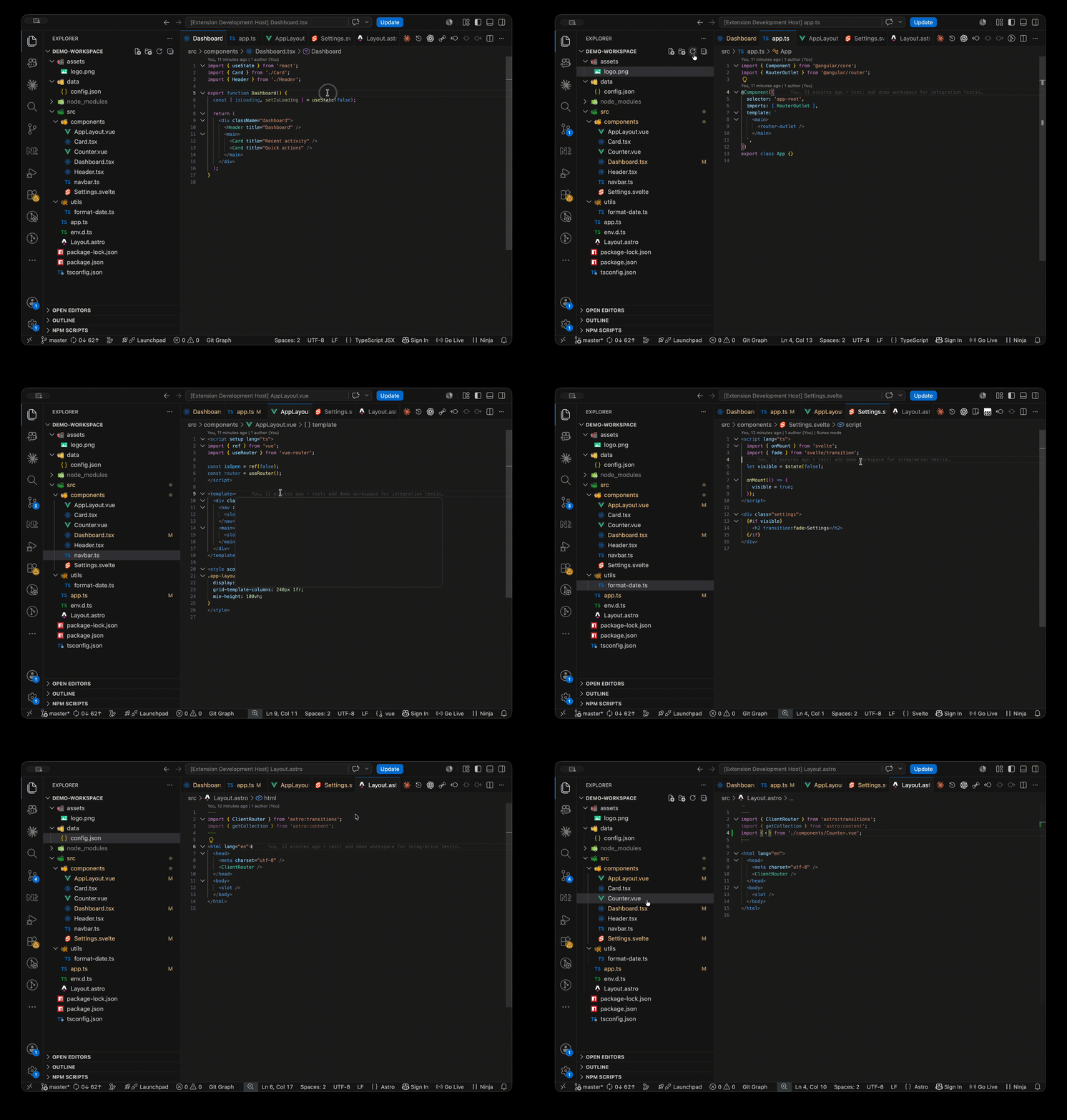
Quick Start
- Install the extension (see below).
- Click a file in the Explorer and press Option+D (Alt+D on Windows/Linux) to auto-import — or use the two-step Cmd/Ctrl+Shift+A then Cmd/Ctrl+I workflow.
- Or drag a file from the Explorer directly into an open editor — the import appears at the drop position.
- The import lands in your editor. Your cursor is on the identifier — name it and Tab out.
Two-step workflow: Cmd/Ctrl+Shift+A to copy a file's path, then Cmd/Ctrl+I in any editor to paste the import. The clipboard holds the path until you copy something else — paste into as many files as you like.
Pick a style on the fly: Run Auto Import: Paste as Import (Pick Style) from the Command Palette, or click Paste with Style on the copy toast. Choose an import shape for one paste without changing your default.
Highlights
- Five commands, three keystrokes — Copy, Paste, and Auto on the keyboard; Pick Style and Set Default Style from the Command Palette
- Drag-and-drop from Explorer — drag any supported file into an editor to insert the import at the drop position, no keyboard required
- Built for every major framework — Angular, React, Vue, Svelte, Astro — plus vanilla JS/TS, CSS/SCSS, HTML, and Markdown
- 35 source extensions — scripts, stylesheets, images, fonts, video, audio, text tracks, data, documents, components
- 38 configurable import styles — ES modules, CommonJS, dynamic
import(),@use,@forward,@import, HTML tags, Markdown syntax - Framework-aware placement — imports land inside Astro
---frontmatter and Vue / Svelte<script>blocks automatically - Smart identifiers — exported class detection for TypeScript, Angular PascalCase auto-fill, CSS Modules
stylesbinding - ~8 KB gzipped, zero dependencies, no telemetry
Commands & Keybindings
| Command | macOS | Windows / Linux | What it does |
|---|---|---|---|
| Copy File Path | Cmd+Shift+A | Ctrl+Shift+A | Copies the file path to clipboard. Shows a toast with Paste Now and Paste with Style buttons. |
| Paste as Import | Cmd+I | Ctrl+I | Reads the clipboard path and inserts the import into the active editor. |
| Insert Import from Selected File | Option+D | Alt+D | Copy + Paste in one step from the Explorer sidebar. |
| Paste as Import (Pick Style) | Command Palette | Command Palette | Shows a picker of all applicable styles for the current pair, then inserts. Does not change your default. |
| Set Default Import Style | Command Palette | Command Palette | Shows a picker and persists the chosen style to your global settings. The current default is marked with a checkmark. |
All five are searchable in the Command Palette (Cmd/Ctrl+Shift+P → Auto Import). The three keyboard shortcuts are rebindable from VS Code's keyboard shortcuts editor.
See SPEC — §Commands & Keybindings for command IDs, context clauses, and workflow details.
Drag-and-Drop
Drag a file from the Explorer into any supported editor. The import snippet is generated with the same styles and settings as the paste commands, and inserted at the drop position. No keybinding needed.
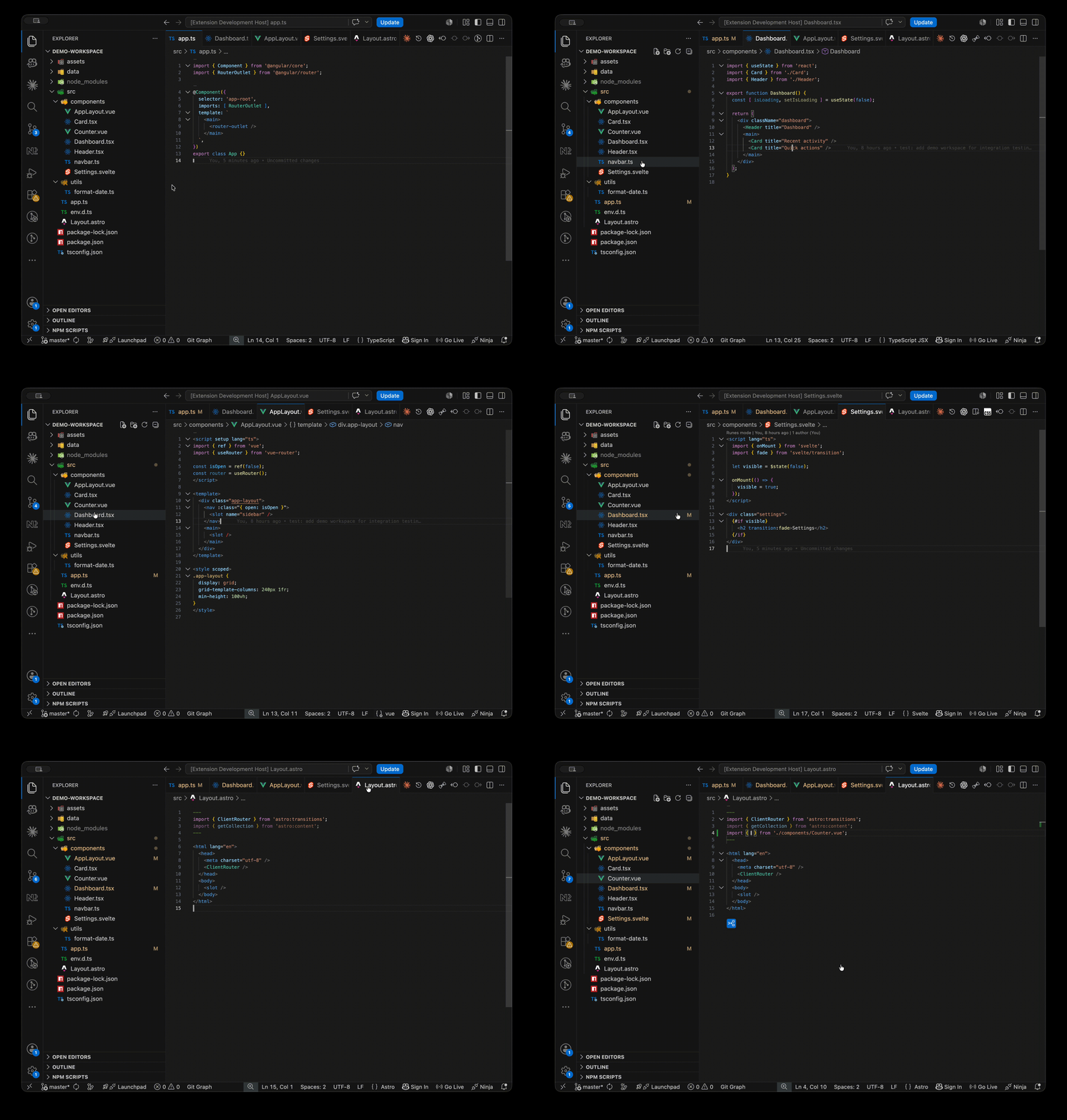
- Uses the same gating, snippet styles, and configuration as paste commands.
- Follows the same Top / Bottom / Cursor placement setting as paste commands — the drop position is used as the Cursor input.
- Unsupported pairs show the same "Cannot import" warning as paste commands (the provider returns no edit).
- See SPEC — §Drag-and-Drop Import for full behavior and differences from paste.
Supported Languages
The extension is destination-driven — the file open in your editor decides which sources it accepts.
| Destination | Accepted sources | What gets generated |
|---|---|---|
.js |
.js |
JavaScript import style (7 configurable) |
.ts |
.ts |
TypeScript import style (7 configurable) |
.jsx |
All except .ts, .tsx |
JS style for scripts; per-category dispatch for others |
.tsx |
All 35 extensions | TS style for .ts/.tsx; JS style for .js/.jsx; per-category for others |
.mdx |
All 35 extensions | Same as .tsx |
.css |
.css, images |
@import style (configurable) or inline url() for images |
.scss |
.scss, .css, images |
@use / @forward / @import (configurable) or inline url() for images |
.html |
.js, .css, images, video, audio, .vtt |
<script>, <link>, <img>, <video>, <audio>, <track> |
.md |
.md, images |
[text](path) or Markdown image syntax |
.vue |
.vue, scripts, images, media, data |
TypeScript import style |
.svelte |
.svelte, scripts, images, media, data |
TypeScript import style |
.astro |
.astro, .vue, .svelte, scripts, images, media, data, .md, .mdx |
TypeScript import style |
See SPEC — §Supported File Extensions for the full 35-extension breakdown by category.
Extension groups
| Group | Extensions |
|---|---|
| Scripts | .ts, .tsx, .mdx, .js, .jsx |
| Images | .gif, .jpeg, .jpg, .png, .svg, .avif, .webp |
| Fonts | .woff, .woff2, .ttf, .eot |
| Video | .mp4, .webm, .mov |
| Audio | .mp3, .ogg, .wav, .m4a |
| Text track | .vtt |
| Data | .json, .yaml, .yml |
| Document | .pdf |
| Stylesheets | .css, .scss |
| Markup | .html, .md |
| Components | .vue, .svelte, .astro |
Rejection rules:
- Same file — a file cannot import itself (case-insensitive path comparison).
- Unsupported pair — source extension not in the destination's accepted list.
.jsand.tsare strict same-extension — no cross-language imports. Use.jsxor.tsxdestinations for asset imports.
See SPEC: Rejection Rules · Cross-Import Compatibility
Import Styles
Every import-style setting maps to a list of shapes. The default shape is index 0. Change it in VS Code Settings (Cmd/Ctrl+, → search auto-import) or run Set Default Import Style from the Command Palette.
In the snippets below, name is an editable placeholder — your cursor lands there so you can type the identifier and Tab out. See SPEC — §Import Statement Styles for every shape with full context.
See also SPEC — §Snippet Placeholders for tab-stop details.
Script — JavaScript & TypeScript
JavaScript — 7 styles
Setting: auto-import.importStatement.script.javascriptImportStyle
Used for .js destinations. Also used for .js/.jsx sources imported into .jsx, .tsx, and .mdx destinations.
| # | Snippet | Description |
|---|---|---|
| 0 | import name from './path'; |
Default import (default) |
| 1 | import { name } from './path'; |
Named import |
| 2 | import name, { other } from './path'; |
Default + named |
| 3 | import * as name from './path'; |
Namespace |
| 4 | import './path'; |
Side-effect (no binding) |
| 5 | const name = require('./path'); |
CommonJS require |
| 6 | const name = await import('./path'); |
Dynamic import |
TypeScript — 7 styles
Setting: auto-import.importStatement.script.typescriptImportStyle
Used for .ts destinations. Also used for .ts/.tsx sources imported into .tsx and .mdx destinations, and for all script sources imported into .vue, .svelte, and .astro destinations.
| # | Snippet | Description |
|---|---|---|
| 0 | import { name } from './path'; |
Named import (default) |
| 1 | import name from './path'; |
Default import |
| 2 | import * as name from './path'; |
Namespace |
| 3 | import './path'; |
Side-effect (no binding) |
| 4 | import type { name } from './path'; |
Type-only import (TS 3.8+) |
| 5 | import { name, type Type } from './path'; |
Mixed value + type (TS 4.5+) |
| 6 | const name = await import('./path'); |
Dynamic import |
Exported class detection (index 0,
.tsdestinations only): when the source file containsexport class Nameorexport abstract class Name, the class name pre-fills thenameplaceholder automatically.
Angular legacy auto-fill (index 0): when the source path contains
.component,.directive,.pipe,.service, or.module, the placeholder is pre-filled with a PascalCase identifier —app-root.component.tsbecomesimport { AppRootComponent } from './app-root.component';. Class detection takes priority when both apply.
See SPEC: JavaScript · TypeScript
Stylesheet — CSS & SCSS
CSS — 2 styles
Setting: auto-import.importStatement.styleSheet.cssImportStyle
Used for .css sources imported into .css destinations.
| # | Snippet | Description |
|---|---|---|
| 0 | @import './path'; |
Quoted path (default) |
| 1 | @import url('./path'); |
url() function |
CSS / SCSS image — inline url()
Image sources imported into .css or .scss destinations are inserted inline at the cursor as a CSS value fragment, not a standalone statement:
url('./path')
No trailing newline — this is meant to be placed inside a background-image, content, or similar property.
SCSS — 5 styles
Setting: auto-import.importStatement.styleSheet.scssImportStyle
Used for .scss and .css sources imported into .scss destinations.
| # | Snippet | Description |
|---|---|---|
| 0 | @use './path'; |
Sass module system (default) |
| 1 | @use './path' as *; |
Module with wildcard — no namespace prefix |
| 2 | @use './path' as name; |
Module with named alias |
| 3 | @forward './path'; |
Re-export (barrel pattern) |
| 4 | @import './path'; |
Legacy @import (Sass-deprecated) |
Partial normalization: a leading
_on the last path segment is stripped —_variables.scssbecomes@use './variables';, matching Sass convention.
.csspreservation: the.cssextension is always kept on SCSS import paths, even whenpreserveStylesheetFileExtensionis off. Sass requires it to recognize a foreign-language import.
See SPEC: CSS · CSS image · SCSS
HTML
<script> — 5 styles
Setting: auto-import.importStatement.markup.htmlScriptImportStyle
Used for .js sources imported into .html destinations.
| # | Snippet | Description |
|---|---|---|
| 0 | <script src="./path"></script> |
Modern minimal (default) |
| 1 | <script src="./path" defer></script> |
Deferred execution |
| 2 | <script type="module" src="./path"></script> |
ES module |
| 3 | <script src="./path" async></script> |
Async execution |
| 4 | <script type="text/javascript" src="./path"></script> |
Legacy |
<img> — 3 styles
Setting: auto-import.importStatement.markup.htmlImageImportStyle
Used for image sources imported into .html destinations.
| # | Snippet | Description |
|---|---|---|
| 0 | <img src="./path" alt="sample"> |
Standard (default) |
| 1 | <img src="./path" alt="" loading="lazy"> |
Lazy loading |
| 2 | <img src="./path" alt="" width="" height=""> |
Explicit dimensions (CLS prevention) |
<video> — 4 styles
Setting: auto-import.importStatement.markup.htmlVideoImportStyle
Used for .mp4, .webm, .mov sources imported into .html destinations.
| # | Snippet | Description |
|---|---|---|
| 0 | <video src="./path" controls></video> |
Accessible default (default) |
| 1 | <video src="./path" autoplay muted loop playsinline></video> |
Silent autoplay (hero sections) |
| 2 | <video src="./path" controls poster=""></video> |
Custom poster thumbnail |
| 3 | <video src="./path" controls preload="metadata"></video> |
Metadata preload (Core Web Vitals) |
<audio> — 2 styles
Setting: auto-import.importStatement.markup.htmlAudioImportStyle
Used for .mp3, .ogg, .wav, .m4a sources imported into .html destinations.
| # | Snippet | Description |
|---|---|---|
| 0 | <audio src="./path" controls></audio> |
Accessible default (default) |
| 1 | <audio src="./path" controls preload="metadata"></audio> |
Metadata preload |
<link> — stylesheet (hardcoded)
<link href="./path" rel="stylesheet">
<track> — text track (hardcoded)
<track src="./path" kind="subtitles" srclang="en" label="English">
srclang and label are editable placeholders.
See SPEC: Script · Image · Video · Audio · Stylesheet · Text track
Markdown
Link (hardcoded)
[text](./path)
Used for .md sources imported into .md destinations.
Image — 3 styles
Setting: auto-import.importStatement.markup.markdownImageImportStyle
Used for image sources imported into .md destinations.
| # | Snippet | Description |
|---|---|---|
| 0 |  |
Bare inline (default) |
| 1 |  |
Inline with hover-text title |
| 2 | <img src="./path" alt="" width="" height=""> |
HTML embed (sizing control) |
JSX / TSX / MDX — non-script sources
When a non-script source is imported into .jsx, .tsx, or .mdx, the shape is determined by the source category — not a configurable setting. All names are editable placeholders.
| Source category | Extensions | Snippet |
|---|---|---|
| CSS Modules | .module.css, .module.scss |
import styles from './path'; |
| Image, data, markup, component, document | .gif, .jpg, .png, .svg, .json, .html, .md, .pdf, .vue, .astro, ... |
import name from './path'; |
| Media, text track | .mp4, .webm, .mp3, .ogg, .vtt, ... |
import url from './path'; |
| Font, stylesheet | .woff, .woff2, .ttf, .eot, .css, .scss |
import './path'; |
Script routing — .jsx routes .js/.jsx sources through the JavaScript style. .tsx and .mdx route .ts/.tsx through the TypeScript style and .js/.jsx through the JavaScript style.
See SPEC — §JSX / TSX / MDX for the full source-category dispatch.
Vue / Svelte / Astro
All source types use the TypeScript import style. Non-script sources (images, media, data) use the same TypeScript import builder with the full source extension preserved on the path.
Import placement is constrained to framework-specific regions — see Placement.
See SPEC — §Vue / Svelte / Astro for import routing details.
Placement
Setting: auto-import.preferences.importStatementPlacement — default "Bottom"
| Mode | Behavior |
|---|---|
| Top | Insert before the first line (line 0). |
| Bottom | Insert after the last recognized import line. Falls back to line 0 if none found. |
| Cursor | Insert at the current cursor position. |
Bottom mode — import detection
Bottom mode scans each line for these markers (comment lines starting with //, /*, or * are skipped):
import       require(       @import '     @import "     @import url(
@use '       @use "         @forward '    @forward "
The import is placed on the line after the last match.
See SPEC — §Bottom Mode for the full marker list and scan logic.
Placement overrides
These take effect regardless of the user's setting:
| Condition | Forced placement | Reason |
|---|---|---|
| HTML or Markdown destination | Cursor (line and column) | No canonical import block for embedded tags. |
Image into .css / .scss |
Inline at cursor (line and column), no trailing newline | url() is a CSS value fragment, not a statement. |
See SPEC — §Placement Overrides for the complete override logic.
Astro frontmatter
For .astro destinations, imports are constrained to within the --- frontmatter fences.
| Mode | Behavior |
|---|---|
| Top | After the opening ---. |
| Bottom | After the last import marker inside the frontmatter. Falls back to after opening ---. |
| Cursor | At the cursor if inside the fences. Otherwise falls back to Bottom. |
If no --- frontmatter exists, a new block is created at line 0.
See SPEC — §Astro Frontmatter for edge cases and cursor rules.
Vue / Svelte script block
For .vue and .svelte destinations, imports are constrained to within a <script> block. Vue prefers <script setup> over bare <script> when both exist.
| Mode | Behavior |
|---|---|
| Top | After the opening <script...> tag. |
| Bottom | After the last import marker inside the script block. Falls back to after opening tag. |
| Cursor | At the cursor if inside the block. Otherwise falls back to Bottom. |
If no script block exists, a new <script> / </script> pair is created at line 0.
See SPEC — §Vue / Svelte Script Block for the full constraint logic.
Insertion column
| Destination type | Column |
|---|---|
Script (.js, .ts, .jsx, .tsx, .mdx, .vue, .svelte, .astro) |
Column 0 |
Stylesheet (.css, .scss) |
Column 0 |
| HTML, Markdown | Cursor's current column |
See SPEC — §Insertion Column for column rules by destination type.
Configuration
All settings live under the auto-import namespace. Open VS Code Settings (Cmd/Ctrl+,) and search auto-import.
Preferences
| Setting | Type | Default |
|---|---|---|
auto-import.preferences.importStatementPlacement |
string | Bottom |
Values: Top, Bottom, Cursor. See Placement.
Script
| Setting | Type | Default |
|---|---|---|
auto-import.importStatement.script.preserveScriptFileExtension |
boolean | false |
auto-import.importStatement.script.javascriptImportStyle |
string | import name from '_relativePath_'; |
auto-import.importStatement.script.typescriptImportStyle |
string | import { name } from '_relativePath_'; |
preserveScriptFileExtension keeps the .js / .ts / .jsx / .tsx extension on the import path. Most module systems resolve without it.
Stylesheet
| Setting | Type | Default |
|---|---|---|
auto-import.importStatement.styleSheet.preserveStylesheetFileExtension |
boolean | false |
auto-import.importStatement.styleSheet.cssImportStyle |
string | @import '_relativePath_'; |
auto-import.importStatement.styleSheet.cssImageImportStyle |
string | url('_relativePath_') |
auto-import.importStatement.styleSheet.scssImportStyle |
string | @use '_relativePath_'; |
auto-import.importStatement.styleSheet.scssImageImportStyle |
string | url('_relativePath_') |
preserveStylesheetFileExtension keeps .css / .scss on the import path. Exception: .css is always preserved in .scss imports — Sass requires it for foreign-language imports.
cssImageImportStyle and scssImageImportStyle have a single shape and are not configurable at runtime.
Markup
| Setting | Type | Default |
|---|---|---|
auto-import.importStatement.markup.htmlScriptImportStyle |
string | <script src="_relativePath_"></script> |
auto-import.importStatement.markup.htmlImageImportStyle |
string | <img src="_relativePath_" alt="sample"> |
auto-import.importStatement.markup.htmlVideoImportStyle |
string | <video src="_relativePath_" controls></video> |
auto-import.importStatement.markup.htmlAudioImportStyle |
string | <audio src="_relativePath_" controls></audio> |
auto-import.importStatement.markup.htmlStyleSheetImportStyle |
string | <link href="_relativePath_" rel="stylesheet"> |
auto-import.importStatement.markup.markdownImportStyle |
string | [text](_relativePath_) |
auto-import.importStatement.markup.markdownImageImportStyle |
string |  |
htmlStyleSheetImportStyle and markdownImportStyle have a single shape and are not configurable at runtime.
See SPEC — §Configuration Reference for every setting with all enum values.
Path Computation
- Relative path — computed from the destination file's directory to the source file. Always uses forward slashes, including on Windows.
./prefix — added when source and destination are in the same directory, or when the computed path doesn't already start with.. Ensures ES module compatibility.- Extension stripping — script and stylesheet extensions are stripped by default. Override with
preserveScriptFileExtensionandpreserveStylesheetFileExtension. All other source types (images, fonts, media, data, documents, components) always keep the full extension. - SCSS partial normalization — a leading
_on the last path segment is stripped._variables.scssbecomesvariablesin the import path. - SCSS
.csspreservation —.cssis always kept on SCSS import paths regardless of thepreserveStylesheetFileExtensionsetting. - Angular PascalCase — TypeScript index 0 only: source paths containing
.component,.directive,.pipe,.service, or.moduleget a pre-filled PascalCase identifier.app-root.component.tsproduces{ AppRootComponent }. - Exported class detection — TypeScript index 0,
.tsdestinations only:export class Nameorexport abstract class Namein the source pre-fills the binding. Takes priority over Angular PascalCase.
See SPEC — §Path Computation for the complete path logic including edge cases.
Tips & Tricks
- Paste into many files. The clipboard keeps the path until you copy something else. Copy once with Cmd/Ctrl+Shift+A, then Cmd/Ctrl+I in every destination.
- Snippet placeholders. After insertion, your cursor lands on the identifier — type the name and Tab to the next stop. No need to click or arrow around.
- CSS Modules are detected automatically. Files named
*.module.cssor*.module.scssimported into JSX/TSX/MDX produceimport styles from '...'instead of a side-effectimport '...'. - Same-directory imports always get
./. You'll never see a bareButton— it's always./Button, which ES modules and bundlers require. - Drag from Explorer for zero-keystroke imports. Drag a file from the sidebar directly into your editor — the import lands at the drop position with the same style as paste. Great for quickly pulling in components or assets without touching the keyboard.
- Mixing CSS into SCSS just works. The
.cssextension is preserved even whenpreserveStylesheetFileExtensionis off, because Sass needs it. - HTML and Markdown ignore your placement setting. Insertion is always at the cursor for these languages. Leave
importStatementPlacementset toBottomfor scripts — it won't affect your markup. - Rebind anything.
extension.copyFilePath,extension.pasteImport, andextension.copyPasteare rebindable from VS Code's keyboard shortcuts editor. The two palette-only commands can be given keybindings from the same editor.
Installation
Requires VS Code 1.115.0 or later.
- Marketplace: Extensions view (Cmd/Ctrl+Shift+X) → search Auto Import Relative Path by ElecTreeFrying → Install.
- CLI:
code --install-extension ElecTreeFrying.auto-import - Direct: VS Code Marketplace listing
Compatibility
- VS Code 1.115.0 or later.
- Compatible hosts: Cursor, VSCodium, Code Server, and other forks that implement the VS Code API at the same engine version.
- Platforms: macOS, Windows, Linux. Paths are normalized to forward slashes on all platforms.
- Bundle:
8 KB gzipped (31 KB minified). Zero runtime dependencies. - Telemetry: None. Everything runs locally.
Troubleshooting
If a keybinding does nothing, an import looks wrong, or you see an unexpected warning — see SUPPORT.md for symptom → cause → fix.
See SPEC — §Notification Reference for a complete list of all warning and info messages.
Changelog
See CHANGELOG.md for full release notes.
Contributing
Contributions, bug reports, and feature requests are welcome. See SUPPORT.md for build/test commands and the architecture overview.
Support
This extension is free and always will be. If it's become part of your workflow, here are a few ways to give back:
- Star the repo on GitHub
- Leave a review on the VS Code Marketplace
- Send a donation to any address below
| Network | Address |
|---|---|
| Bitcoin | bc1q4j2uewfphjmca83905qv37vcl4jh8va5yupl7w |
| Solana | EHtTGyRoDAK44KBGrEoypAWyPpResHUqwufKnuLs7Tyy |
| Sui | 0xcaf8ff4a65d7e35d961abd0203180013b7fe974d4fa0313e880c39c45ada2b09 |
| ERC-20 (Ethereum / Base / Monad / Polygon / HyperEVM) | 0xd25f84Ed2F76dF2F0C8f1207402eF9e15b5d7855 |
Related
- All extensions by ElecTreeFrying on the VS Code Marketplace.
License
