Sniff








English · 简体中文 · 日本語 · Español · Français
Point it at your running app. It walks your real user flows in a real browser and tells you what's actually broken, with proof.
Get started · What it finds · Why trust it · How it works · Demo · FAQ
What is this?
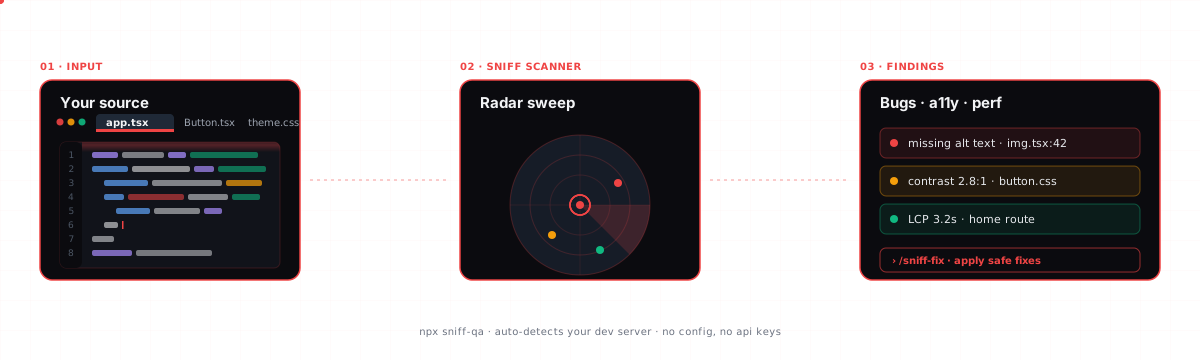
Sniff is an autonomous QA scanner. You point it at a running web app and it walks your app's real user flows in a real (headless) browser (clicking buttons, filling forms, following links) and reports what's actually broken.
It is not a linter and not a static scanner. It opens your pages, interacts with them like a user would, and watches what happens.
Every bug it reports comes with proof: the exact page, the ordered steps to reproduce it, a screenshot, and the console or network excerpt that caught it. A finding without reproduction proof is not a finding.
npx sniff-qa --url http://localhost:3000
One command, no config, no API key, no Playwright setup. Point it at your running app, or just run npx sniff-qa from your project and it auto-detects a dev server on common ports.
Sniff walks a running app. If no dev server is running, it falls back to a source-code scan and tells you exactly how to start the real walk. See Get started.
Get started
You need Node.js 22+ and a web app you can run locally (or a URL).
Naming: the npm package is
sniff-qa, so usenpx sniff-qaornpm install -D sniff-qa. Once installed, the binary issniff(thesniff-qabinary works too). Don't runnpx sniff, that's a different package.
1. Start your app
npm run dev # or however you start your app
2. Walk it
In another terminal:
npx sniff-qa --url http://localhost:3000 # point it at your running app
That's the reliable one-liner. Sniff also auto-detects a dev server on common ports, so from your project folder you can often just run npx sniff-qa with no flags. If your app is on a non-standard port (or auto-detect misses it), pass --url (that always works). It also walks a deployed URL:
npx sniff-qa --url https://staging.myapp.com
Found bugs? It exits non-zero, on purpose. A walk that finds issues exits with code
1so CI fails the build; it is not a crash (you'll see a✓ Scan completeline). Pass--fail-on noneto always exit0.
First run downloads a browser. The first time Sniff opens a browser it downloads a Chromium build (~165 MB, one-time). You'll see the progress. You need internet access for that first run; after that it's cached.
3. Read the report
Findings print to your terminal, grouped by severity, each with steps to reproduce. Want a shareable page?
npx sniff-qa --url http://localhost:3000 --report # runs a walk, then writes sniff-reports/sniff-report.html (self-contained)
No app running? Sniff doesn't fail silently. It runs a source-only scan and prints a clear next step (start your dev server or pass --url) so you can get to the real flow-walk. You can also run the source scan on purpose:
npx sniff-qa scan # source-only scan, no browser
Stuck? Run npx sniff-qa doctor to check your environment (Node, browser, dev server).
What it finds
Sniff walks your app and looks for 12 classes of real bugs:
| # | Class | Examples |
|---|---|---|
| 1 | Broken pages / routes | 4xx/5xx responses, blank renders, crash screens |
| 2 | Broken links | Dead internal and external links |
| 3 | Console & network errors | Uncaught exceptions and failed requests during interaction |
| 4 | Empty & fake data | Missing data, plus placeholders like lorem ipsum, TODO, [email protected] |
| 5 | Broken forms | Dead submit buttons, validation that never fires |
| 6 | State loss | Fill a form, hit back, and it's wiped |
| 7 | Flow regressions / dead-ends | A journey that can't be completed |
| 8 | Bad loading & error states | Infinite spinners, missing error states |
| 9 | Broken async outcomes | Submitted but no success feedback (flagged "needs out-of-band verification") |
| 10 | Responsive issues | Overflow and tiny tap targets (a 375px mobile pass) |
| 11 | Accessibility | Missing alt text and labels, contrast, via axe-core |
| 12 | Unclear primary actions | The main call-to-action is buried or ambiguous |
Each finding ships with:
- Reproduction proof: the exact route, the ordered steps, a screenshot, and the console/network excerpt.
- A severity, so you fix the right thing first.
- A confidence:
confirmed,likely, oruncertain. Uncertain findings are hidden by default; add--allto see them. - A suggested fix.

Why you can trust it
Most scanners drown you in false positives until you stop reading them. Sniff is built the opposite way.
We measured it on a fixture app planted with 21 bugs across all 12 classes, plus a clean control page that should produce zero findings:
| Old engine | New engine | |
|---|---|---|
| Bugs found | 9 / 21 (43%) | 21 / 21 (100%) |
| Precision | ~13% | 100% |
| False positives | 125 | 0 |
| Findings on the clean page | n/a | 0 |
| Flagship command | crashed | works |
Those numbers are locked as a regression test. The full suite is 441 tests.
How it keeps false positives near zero:
- A first-party noise filter drops the junk that isn't your bug: favicons, analytics, hot-module-reload chatter, expected auth redirects, engine aborts.
- Accessibility findings are backed by axe-core, which is zero-false-positive by design.
- Uncertain findings are suppressed by default (use
--allto see them). - A broken page is reported once, not re-flagged on every link that points to it.
If Sniff can't prove a bug, it doesn't claim one.
How is it different?
Linters read your source. End-to-end frameworks make you write the tests. Link checkers only check links. Sniff drives your real app and judges the result.
| Sniff | linkinator | pa11y | Playwright codegen | QA-Wolf-style services | |
|---|---|---|---|---|---|
| Walks real user flows in a browser | Yes | No | No | You script it | Yes |
| Zero setup, zero test-writing | Yes | Yes | Yes | No (you write tests) | No (onboarding) |
| Broken links | Yes | Yes | No | Manual | Manual |
| Accessibility (axe-core) | Yes | No | Yes | Manual | Some |
| Empty / placeholder / fake data | Yes | No | No | No | No |
| State-loss (back-button wipes a form) | Yes | No | No | Manual | Manual |
| One-shot reproduction proof per finding | Yes | No | Partial | No | Varies |
| Self-contained HTML report | Yes | No | Partial | No | Dashboard |
| Runs locally, no account, no API key | Yes | Yes | Yes | Yes | No (service) |
What Sniff uniquely does in one command: catch empty/placeholder data, state-loss, and broken async outcomes, and hand you a single proof report, with no scripts to write and no service to sign up for.
Commands
sniff                  Walk your app (auto-detects the dev server). The default.
sniff --url <url>      Walk a specific URL
sniff scan             Source-only scan, no browser (placeholders, TODOs, dead links, etc.)
sniff report           Show the results from the last run
sniff doctor           Check your environment (Node, browser, config, dev server)
sniff ci               Generate a GitHub Actions workflow
sniff fix              Auto-fix safe issues (console.log, debugger, etc.)
sniff --help           Show every command and flag
sniff --version        Show the version
Useful flags
| Flag | What it does |
|---|---|
--url <url> |
Walk this URL instead of auto-detecting |
--report |
Write a self-contained HTML report to sniff-reports/sniff-report.html |
--all |
Also show low-confidence (uncertain) findings |
--max-pages <n> |
Cap how many pages to walk (default: 25) |
--no-mobile |
Skip the 375px responsive pass |
--headed |
Show the browser window while it walks |
--json |
Machine-readable JSON output |
--ci |
CI mode (stable output, non-interactive) |
--fail-on <sev> |
Exit non-zero on findings at or above this severity |
Demo
A real run against a buggy app: 21 real issues, zero false positives, every finding with severity, confidence, reproduction steps, and a fix. Watch Sniff walk the app and stream findings in (the animated demo plays at the top of this README, .github/assets/demo.gif).
Below is the same run as a stylized terminal still:
Use it from your AI editor
Sniff ships as an MCP server too. Add it once, then just ask your assistant "scan this project for bugs" or "walk my app." If your app is running, Sniff auto-detects it, so you don't have to pass a URL.
One unified sniff tool, three modes:
walk: recommended. Walks your running app's real flows (the flow-walk above).scan: source-only scan, no browser.report: show the last run's results.
(run and discover are legacy modes kept for back-compat.)
Slash commands and MCP tools
As a Claude Code plugin, Sniff adds three slash commands:
| Slash command | What it does |
|---|---|
/sniff |
Walk your running app and find real bugs (the flow-walk). |
/sniff-fix |
Scan and auto-fix safe issues (stray console.log, debugger, etc.). |
/sniff-report |
Show the results from the last run. |
As an MCP server, the surface is one unified sniff tool that takes { mode, rootDir, baseUrl? }. The three modes above (walk / scan / report) are how you drive it, and the unified tool is what you should use. Narrow, single-purpose tools (sniff_scan, sniff_run, sniff_report, plus sniff_discover and sniff_install) stay registered for back-compat and scoped capabilities, but new work should go through the unified sniff tool.
Install the skills into any AI CLI
The MCP server above works in every MCP-capable client. To also load the /sniff skills directly into another CLI, run the one-line installer. It symlinks the three skills into that CLI's skills directory; --update pulls the latest and relinks, --uninstall removes them.
curl -fsSL https://raw.githubusercontent.com/Aboudjem/sniff/main/install.sh | bash -s codex
On Windows, run install.ps1 <platform> from a checkout (Developer Mode or an elevated shell is needed for symlinks).
| Platform | Skills directory | One-liner |
|---|---|---|
| Claude Code | (plugin) | claude plugin install sniff@10x |
| Codex / Gemini / OpenCode / Pi | ~/.agents/skills |
install.sh codex |
| VS Code (Copilot) | ~/.copilot/skills |
install.sh copilot |
| Trae | ~/.trae/skills |
install.sh trae |
| Vibe | ~/.vibe/skills |
install.sh vibe |
| OpenClaw | ~/.openclaw/skills |
install.sh openclaw |
| Antigravity | ~/.gemini/antigravity/skills |
install.sh antigravity |
| Hermes / Cline / Kimi | ~/.<cli>/skills |
install.sh hermes |
Skill-directory conventions change between CLI releases. If a link does not resolve, fall back to the MCP server (it works everywhere). Run install.sh all to link every platform at once.
Claude Code
One-command plugin install from the 10x marketplace:
claude plugin marketplace add Aboudjem/10x
claude plugin install sniff@10x
Or add just the MCP server:
claude mcp add sniff-qa npx -- -y sniff-qa --mcp
Cursor
Add to ~/.cursor/mcp.json:
{ "mcpServers": { "sniff-qa": { "command": "npx", "args": ["-y", "sniff-qa", "--mcp"] } } }
VS Code (Copilot)
Add to .vscode/mcp.json:
{ "servers": { "sniff-qa": { "type": "stdio", "command": "npx", "args": ["-y", "sniff-qa", "--mcp"] } } }
Codex CLI
codex mcp add sniff-qa -- npx -y sniff-qa --mcp
Gemini CLI
Add to ~/.gemini/mcp_config.json:
{ "mcpServers": { "sniff-qa": { "command": "npx", "args": ["-y", "sniff-qa", "--mcp"] } } }
Windsurf
Add to ~/.codeium/windsurf/mcp_config.json:
{ "mcpServers": { "sniff-qa": { "command": "npx", "args": ["-y", "sniff-qa", "--mcp"] } } }
Continue.dev
Add to .continue/mcpServers/sniff-qa.yaml:
mcpServers:
  sniff-qa: { command: npx, args: ["-y", "sniff-qa", "--mcp"], type: stdio }
The first browser-based walk downloads Chromium (~165 MB). Over MCP, Sniff returns a structured
needsSetuppayload instead of blocking the editor on a long download: run the install it shows you, then ask again.
How it works
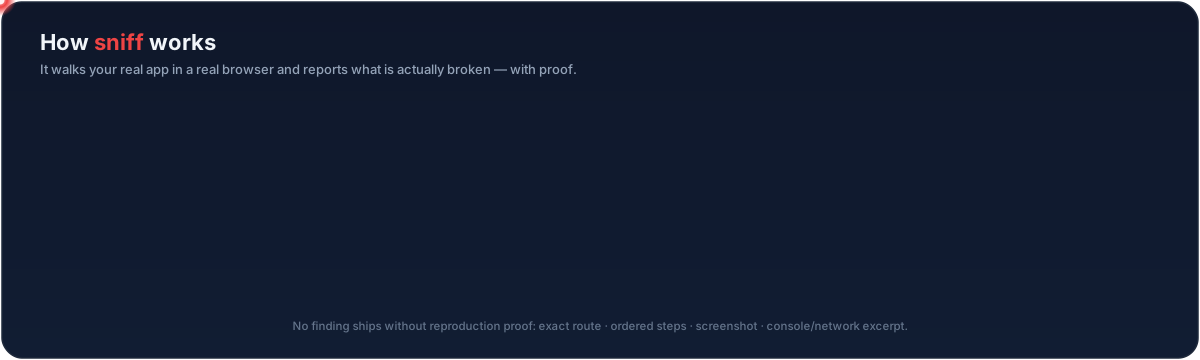
- Find the app. Sniff auto-detects your running dev server (or you pass
--url). - Walk the flows. It opens pages in a headless browser and interacts with them like a user (clicking, filling forms, following links) across desktop and a 375px mobile pass.
- Watch everything. It records console errors, failed network requests, broken renders, missing feedback, and accessibility issues as it goes.
- Filter the noise. The first-party noise filter and axe-core drop the false positives; uncertain findings are held back.
- Report with proof. Each surviving finding gets a severity, a confidence, reproduction steps, a screenshot, and a suggested fix, in the terminal and an optional HTML report.
CI integration
Run Sniff in your pipeline and fail the build on real bugs:
npx sniff-qa --ci --fail-on high
Generate a ready-to-commit GitHub Actions workflow:
npx sniff-qa ci
This writes .github/workflows/sniff.yml with browser caching and report artifacts.
FAQ
Does it work without a dev server?
Sniff is built to walk a running app, so that's where it shines. If no server is running, it doesn't fail silently: it runs a source-only scan and tells you exactly how to start the real walk (start your dev server or pass --url). You can also run npx sniff-qa scan to get the source scan on purpose.
What gets downloaded on first run? The first time Sniff opens a browser, it downloads a Chromium build (~165 MB, one-time, then cached). You'll see the progress, and you need internet access for that first run. Nothing else is installed and no account is created.
Do I need an API key? No. Sniff runs entirely on your machine with no API key and no signup. Your code and your app never leave your computer.
How is it different from a linter? A linter reads your source files and never runs your app, so it can't see a dead submit button, an infinite spinner, a wiped form, or a 500 page. Sniff opens your real app, interacts with it, and reports what actually broke, with a screenshot and steps to reproduce.
How is it different from Playwright codegen (or writing E2E tests)? Playwright codegen records a script that you author and maintain; it tests only the path you clicked. Sniff writes nothing for you to maintain: it explores your flows on its own and judges the outcome, catching things a recorded happy-path never checks (empty/placeholder data, state-loss, missing success feedback).
Will it change my code?
No, not during a walk. Walking and scanning are read-only. The separate sniff fix command applies safe auto-fixes (like stray console.log/debugger) and only when you run it.
What stacks does it work with? Any web app you can open in a browser: React, Next.js, Vue, Svelte, Angular, Remix, SvelteKit, Astro, plain HTML, and more. It walks the rendered app, so the framework doesn't matter for the browser checks.
Works first-class in
Claude Code · Cursor · VS Code (Copilot) · Codex · Gemini CLI · Windsurf · Continue.dev, via the MCP server (command npx, args ["-y", "sniff-qa", "--mcp"]) or the CLI directly.
Star History
Contributing
Issues and PRs welcome. See CONTRIBUTING.md.
Built on Playwright · axe-core · Lighthouse · pixelmatch · Zod · MCP SDK


Built by Adam Boudjemaa · Apache 2.0
