Claude Code Pr Dashboard

Claude Code PR Dashboard
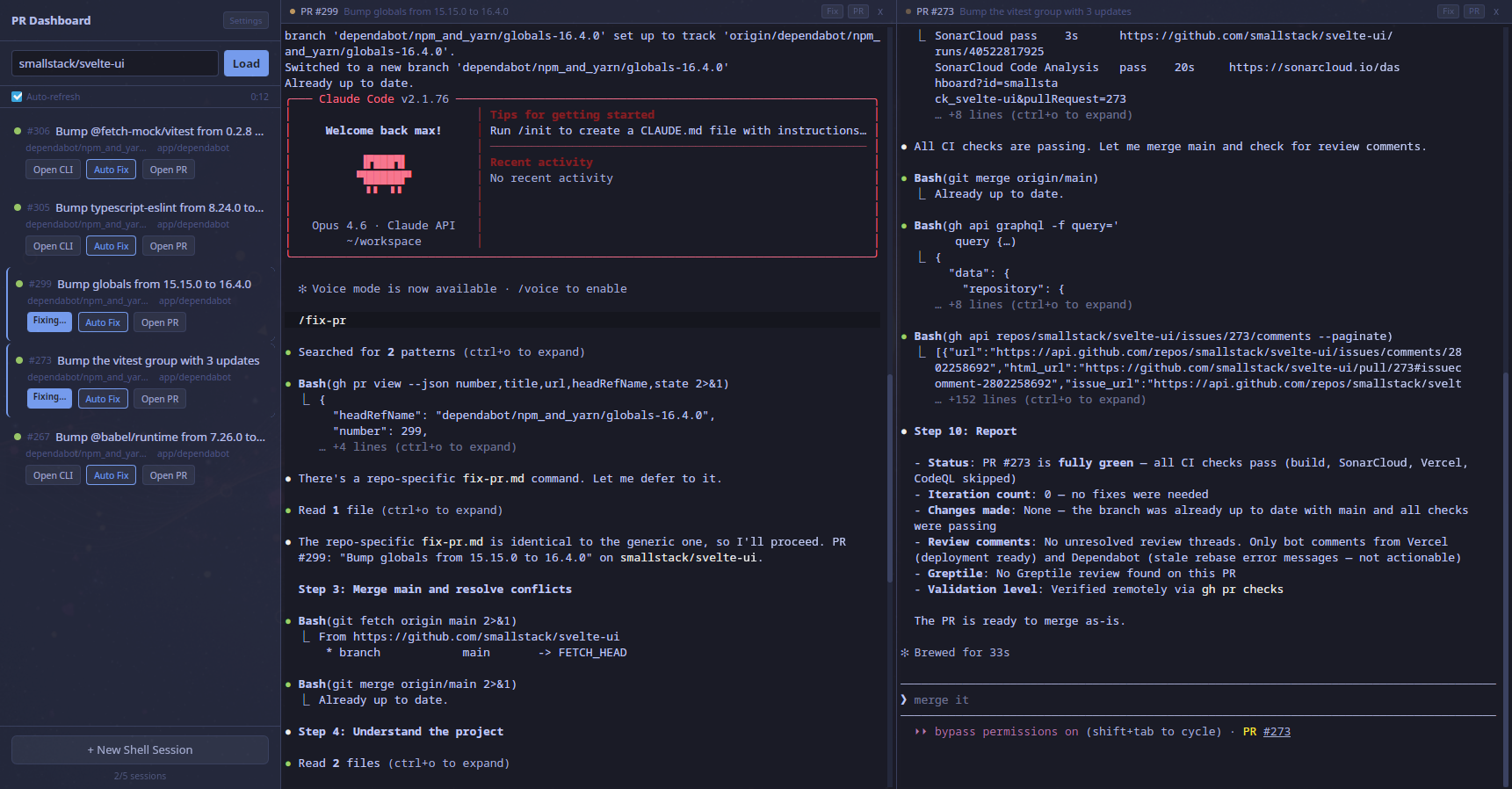
Is PR review and CI fixing the bottleneck in your AI-powered development workflow? If you're running multiple Claude Code sessions across separate terminals, each paired with a browser tab to track the corresponding PR, this tool is for you. Manage all your open PRs in one place, spawn isolated Claude Code sessions per PR, and let them autonomously fix CI failures and address review comments — in parallel, with a single click.
Why?
A typical AI-assisted dev workflow looks like this: plan a task in Claude Code, let it implement, steer when needed, run /fix-pr to polish, then track the PR in the browser. Doing this across 3+ parallel workstreams means juggling terminal windows and browser tabs with no connection between them.
This app puts everything in one place — PR list, CI status, and Claude Code terminals side by side.
Architecture
┌──────────────────────────────────────────────────────┐
│  ┌──────────┐  ┌──────────────────────────────────┐  │
│  │ Sidebar  │  │ Terminal Sessions (1-5)          │  │
│  │          │  │                                  │  │
│  │ owner/   │  │ ┌──────────┐ ┌──────────┐       │  │
│  │ repo     │  │ │ PR #42   │ │ Shell    │  ...  │  │
│  │ [Load]   │  │ │ claude>  │ │ $        │       │  │
│  │          │  │ └──────────┘ └──────────┘       │  │
│  │ PR List  │  │                                  │  │
│  │ #42 ...  │  │ (each Claude session runs in     │  │
│  │ #38 ...  │  │  its own Docker container)       │  │
│  └──────────┘  └──────────────────────────────────┘  │
└──────────────────────────────────────────────────────┘
How It Works
Each Claude Code session runs inside an isolated Docker container. When you click "Open CLI" or "Auto Fix" on a PR:
- The app spawns a new container from the
docker/image - The container clones the target repository using your GitHub token
- If a branch is specified (Auto Fix), it checks out the PR branch
- Dependencies are installed (
npm ciifpackage.jsonexists) - Bundled commands (like
/fix-pr) are injected if the repo doesn't have its own - Claude Code launches with
--dangerously-skip-permissions(safe inside the container)
Each session gets a fully isolated environment — no worktree conflicts, no local repo needed, and multiple sessions can work on different branches simultaneously.
The /fix-pr Command
The app ships with a generic /fix-pr command that works across any repository. When triggered, Claude will:
- Read the repo's own instructions (CLAUDE.md, CONTRIBUTING.md, etc.)
- Merge main and resolve conflicts
- Analyze CI failures and review comments
- Fix issues with local validation
- Push and iterate (up to 5 attempts) until CI is green
If a repo already has its own .claude/commands/fix-pr.md, that takes precedence over the bundled version.
Prerequisites
- Node.js >= 18
- Rust (latest stable)
- Tauri v2 CLI
- Docker (with Docker Compose)
- GitHub CLI (
gh) — authenticated viagh auth login - Claude Code CLI — authenticated once locally (credentials are mounted into containers)
- System dependencies for Tauri (see Tauri prerequisites)
Setup
# Install frontend dependencies
npm install

# Install Tauri CLI
cargo install tauri-cli --version "^2"

# Build the Docker image (one-time)
docker compose -f docker/docker-compose.yml build

# Run in development mode
cargo tauri dev
Configuration
All settings are configured in the app's Settings panel (no environment variables needed):
- GitHub Token — for listing PRs and cloning repos inside containers
- Claude Credentials Path — path to your
~/.claude/.credentials.json(mounted read-only into containers) - Git Name / Email — optional, used for commits inside containers
Usage
- Enter a GitHub repository (e.g.
owner/repo) in the sidebar - Click Load to fetch open PRs (auto-refreshes every 10 minutes)
- For each PR you can:
- Open CLI — spawns a Docker container with the repo cloned, opens Claude Code
- Auto Fix — spawns a container, checks out the PR branch, and sends
/fix-pr - Open PR — opens the PR in your browser
- Click + New Shell Session for a local terminal (no Docker)
- Up to 5 sessions can run side-by-side
Tech Stack
| Layer | Technology | Purpose |
|---|---|---|
| Shell | Tauri v2 | Lightweight desktop runtime (smaller and faster than Electron) |
| Frontend | Svelte 5 (runes) | Reactive UI |
| Bundler | Vite 6 | Frontend build tooling |
| Terminal | xterm.js | Terminal emulation |
| PTY | portable-pty (Rust) | Cross-platform pseudo-terminal |
| Sandbox | Docker | Isolated Claude Code environment per session |
| GitHub | gh CLI | PR data and authentication |
| AI | Claude Code CLI | AI-powered code fixing |
Downloads
Pre-built binaries are automatically published to GitHub Releases for every release:
| Platform | Formats |
|---|---|
| Linux | .deb, .AppImage |
| Windows | .msi, .exe (NSIS installer) |
| macOS (Apple Silicon) | .dmg |
| macOS (Intel) | .dmg |
Note: Binaries are unsigned. On Windows you may see a SmartScreen warning, and on macOS a Gatekeeper prompt — both can be dismissed to proceed with installation.
Limitations
- Max 5 sessions — practical limit for side-by-side usability
- Requires Docker — each Claude session runs in a container
- Requires
ghCLI on host — for listing PRs in the sidebar - Linux/macOS primary — Tauri v2 supports Windows but Docker/PTY behavior may differ
