Codex Pocket

Codex Pocket

Remote control for your local Codex on your Mac from your iPhone.
This project started as a local-only fork of Zane (credit: https://github.com/z-siddiqi/zane):
- No Cloudflare
- No public internet exposure required
- Local persistence via SQLite
First-Time Setup (Checklist)
- Create a (free) Tailscale account: https://tailscale.com/
- Install Tailscale on your Mac + iPhone and sign in to both.
- Install Codex Pocket on your Mac:
curl -fsSL https://raw.githubusercontent.com/ddevalco/codex-pocket/main/scripts/install-local.sh | bash
- Expose it on your tailnet (Mac):
tailscale up
tailscale serve --bg http://127.0.0.1:8790
- Pair your iPhone:
- On Mac: open
http://127.0.0.1:8790/adminand sign in with your Access Token. - Scan the pairing QR with your iPhone.
If anything doesn’t work, run:
~/.codex-pocket/bin/codex-pocket ensure
Docs
- Install:
docs/INSTALL.md - CLI:
docs/CLI.md - Admin:
docs/ADMIN.md - Troubleshooting/FAQ:
docs/TROUBLESHOOTING.md - Provider Troubleshooting:
docs/TROUBLESHOOTING_PROVIDERS.md - Architecture:
docs/ARCHITECTURE.md - CI:
docs/CI.md - Native iOS roadmap:
docs/NATIVE_IOS_ROADMAP.md - Differences from Zane:
docs/DIFFERENCES_FROM_ZANE.md - Development:
docs/DEVELOPMENT.md - Testing playbook:
docs/TESTING.md - Contributing:
CONTRIBUTING.md
Backlog (Canonical)
We track the canonical backlog in GitHub Projects:
Issues (Canonical)
All bugs, features, and reliability work are tracked as GitHub Issues:
Workflow rules:
- Open an issue before starting work.
- Link every PR to an issue (
Fixes #...orRefs #...). - Keep issue status in sync with Project 2.
Prioritized engineering recommendations are maintained in:
Common First-Run Issues
codex-pocket: command not found- The CLI is installed at
~/.codex-pocket/bin/codex-pocket. - Quick run:
~/.codex-pocket/bin/codex-pocket summary - Add to PATH (zsh):
echo 'export PATH="$HOME/.codex-pocket/bin:$PATH"' >> ~/.zshrcexec zsh
- From this repo, run
./bin/codex-pocket ...(if youcd bin, use./codex-pocket, notcodex-pocket).
- The CLI is installed at
"Serve is not enabled on your tailnet"
- Tailscale may require you to explicitly enable Serve in your tailnet admin settings.
- Run
tailscale serve --bg http://127.0.0.1:8790and follow the link Tailscale prints to enable Serve.
Admin shows "Failed to fetch" or stays on "Loading..."
- The browser can’t reach the local server.
- Run
~/.codex-pocket/bin/codex-pocket ensure.
Admin asks for the Access Token again
- If you reinstalled or rotated the token, the browser must re-auth.
- Run
~/.codex-pocket/bin/codex-pocket tokento print it.
iPhone opens the tailnet URL but shows disconnected / no device
- Confirm Tailscale is connected on iPhone and Mac.
- Open
/adminon the Mac and click Validate then Repair.
Port conflict / service won’t start
- Run
~/.codex-pocket/bin/codex-pocket diagnoseto see what’s listening and the latest logs.
- Run
Features
- 📱 Remote control for Codex on Mac from your iPhone
- 🔐 Secure E2E connection via Tailscale
- 🎨 Multi-provider support (Codex, GitHub Copilot)
- 💾 Local-first data persistence
- ⚡ Real-time WebSocket communication
- 🧪 Bundle size guardrails and release preflight checks
Multi-Provider Support
Codex Pocket now supports multiple AI providers in a single interface:
- Codex: Full read/write support (default)
- GitHub Copilot (Phase 1): Read-only session viewing via ACP protocol
Viewing Copilot Sessions
If you have the GitHub Copilot CLI installed (gh copilot or copilot):
- Start a Copilot session in your terminal
- Open Codex Pocket on your iPhone
- Navigate to the Home screen
- Your Copilot sessions appear in the "GitHub Copilot" section
Phase 1 provides read-only access:
- ✅ View Copilot sessions alongside Codex threads
- ✅ See session titles, previews, and timestamps
- ❌ Cannot send prompts or modify Copilot sessions (coming in Phase 2)
Adding More Providers
Codex Pocket uses a pluggable adapter architecture. See docs/PROVIDERS.md for a guide on adding new AI providers.
How Codex Pocket Differs From Zane
Codex Pocket is a focused fork for a single use case: run Codex locally on macOS and access it securely from iPhone over Tailscale.
Key differences:
- No Cloudflare dependency: Codex Pocket uses a single local server (
local-orbit) with token-based auth (legacy access token + per-device sessions). - Tailnet-first exposure: binds to
127.0.0.1and is designed to be exposed viatailscale serveto devices on your tailnet (no public internet required). - Simplified auth + pairing: one legacy Access Token for bootstrap/admin plus short-lived pairing QR that mints per-device session tokens.
- Installer + lifecycle UX: one-line installer,
launchdintegration (with background fallback), and a fullcodex-pocketCLI (doctor/summary/urls/token/start/stop/restart/status/logs/pair/open-admin/ensure/smoke-test/update). - Local persistence: SQLite-backed event log + replay endpoints powering the Review UI.
- iPhone-first usability: default Enter = newline (send via Cmd/Ctrl+Enter), plus mobile-oriented UI fixes.
- Concurrency: composing in thread B while thread A runs now works (per-thread progress tracking).
- Image uploads: stored locally, served as capability URLs, configurable retention + cleanup from Admin.
- Vision attachments: uploaded images are now forwarded to Codex app-server as structured attachments (so vision-capable models can consume pixels), while still rendering inline in the chat UI.
- Thread titles + rename sync: Codex Pocket reads Codex Desktop's local thread title store so renamed titles show correctly, and can rename threads by updating the same store.
- Update reliability + anti-regression tooling:
update/ensure/self-testand CI smoke tests are designed to catch regressions like blank threads quickly;index.htmlis served withCache-Control: no-storeto reduce “cached broken bundle” issues after updates. - Export/share + copy UX: export/share threads as Markdown/JSON and improved copy affordances (works on
http://origins via a clipboard fallback), with iOS-friendly share-sheet behavior.
What You Get
- Web UI (mobile-friendly): create tasks, watch live output, approve/deny writes, review diffs
- Image attachments: upload from iPhone, embed inline in threads
- Composer UX: Enter inserts newline by default (configurable per-device)
- Admin UI (
/admin): status, logs, start/stop Anchor, one-time pairing QR for your iPhone - One local server (
local-orbit) that serves:- UI (static)
- WebSockets (
/ws) for realtime control - REST endpoints for event replay (
/threads/:id/events) - Thread title enrichment (reads
~/.codex/.codex-global-state.json)
Demo
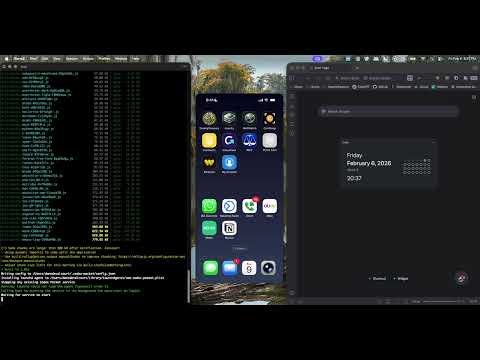
CI (GitHub Actions)
This repo includes a GitHub Actions workflow (.github/workflows/ci.yml) that builds the UI and runs smoke tests (including a WebSocket relay test) to catch regressions like “blank threads”.
Security Model
- You must be on the same Tailscale tailnet as the Mac.
- Auth supports:
- legacy Access Token (bootstrap/admin),
- per-device token sessions (create/list/revoke in
/admin).
- Pairing:
/adminmints a short-lived one-time pairing code (shown as QR).- Consuming the code on iPhone returns a unique per-device session token.
- Session tokens can be revoked individually in
/admin. - QR pairing is token-session auth (not WebAuthn passkey auth).
Why Tailscale?
Codex Pocket is built around a simple security goal: don’t expose your local Codex to the public internet. Tailscale is what makes that practical.
What it provides in this setup:
- Private access: your iPhone can reach your Mac as if it’s on the same LAN, but only inside your tailnet.
- Encryption in transit: traffic is encrypted between devices.
- Stable device URL: MagicDNS gives your Mac a stable hostname (e.g.
my-mac.tailXXXX.ts.net). - No public tunnel vendor: you don’t need Cloudflare (or any third-party tunnel) to make the UI reachable.
How it fits Codex Pocket:
- Codex Pocket binds locally to
127.0.0.1. tailscale servepublishes that local-only service to your tailnet over HTTPS/WSS.- The Admin/WS endpoints remain protected by your Codex Pocket Access Token (and the iPhone pairing QR).
Uploads (Images)
- Uploads are stored locally on your Mac (default:
~/.codex-pocket/uploads). - Upload retention is permanent by default (
0days). You can set retention (days) in/admin. - Uploaded images are served via capability URLs (
/u/<token>). This avoids putting your Access Token in image URLs and allows<img>tags to load on iPhone.
Install (macOS)
curl -fsSL https://raw.githubusercontent.com/ddevalco/codex-pocket/main/scripts/install-local.sh | bash
After install:
- The service listens locally on
http://127.0.0.1:8790. - Your Access Token is printed by the installer and is also copied to your clipboard automatically (macOS
pbcopy, best-effort).
What the installer does:
- Checks dependencies (git, bun, tailscale) and helps you install missing pieces.
- Builds the web UI (so you get a single self-contained local server + static UI).
- Writes state/config under
~/.codex-pocket/. - Attempts to install a
launchdagent. If your system blockslaunchctl(common on managed Macs), it will fall back to running in the background and printsService started via: .... - Optionally configures
tailscale serveso your iPhone can reach the service via MagicDNS.
Wipe / Reset
If you want a clean slate (stop service, disable tailscale serve, remove launchd agent, delete ~/.codex-pocket):
curl -fsSL https://raw.githubusercontent.com/ddevalco/codex-pocket/main/scripts/reset-and-install.sh | bash
If you only want to wipe without reinstalling, run the local script after install:
~/.codex-pocket/app/scripts/wipe-local.sh
Enable iPhone Access (Tailscale)
If you do not have Tailscale yet:
- Create a (free) Tailscale account: https://tailscale.com/
- Install Tailscale on Mac + iPhone and sign in to both with the same account
- Run
tailscale upon the Mac
Terminology:
- A tailnet is your private Tailscale network (your account/org + its devices).
- MagicDNS is Tailscale's stable DNS name for your devices (e.g.
my-mac.tailXXXX.ts.net).
Expose the service on your tailnet (run on Mac):
tailscale serve --bg http://127.0.0.1:8790
Note: Some tailnets require you to enable Tailscale Serve in the admin console the first time. If you see an error like "Serve is not enabled on your tailnet", follow the link it prints and enable it.
Then open on your Mac (to pair your iPhone):
http://127.0.0.1:8790/admin- generate a pairing QR and scan it with your iPhone
What to expect after pairing:
- Your iPhone will open
https://<your-mac-magicdns-host>/and connect automatically (no manual “server URL” setup). - Threads/models populate after the Anchor connects (usually a few seconds). If you see “No device connected”, check
/adminand~/.codex-pocket/anchor.log. - Existing threads may appear immediately, but some Codex versions do not replay full historical transcripts into third-party UIs. In that case, only new activity will show up. (We’re iterating on better backfill.)
Note about the Codex desktop app:
- Codex Pocket is its own UI. Messages you send from Codex Pocket may not immediately appear in the Codex desktop app UI without a refresh/restart of the desktop app.
Developer Notes
- Local server:
services/local-orbit/src/index.ts - Anchor:
services/anchor/src/index.ts
Docs
- Install:
docs/INSTALL.md - Admin UI:
docs/ADMIN.md - CLI:
docs/CLI.md - Architecture:
docs/ARCHITECTURE.md - Security:
docs/SECURITY.md - Config:
docs/CONFIG.md - Protocol:
docs/PROTOCOL.md - Security hardening:
docs/HARDENING.md - Troubleshooting:
docs/TROUBLESHOOTING.md - Native iOS roadmap:
docs/NATIVE_IOS_ROADMAP.md - Changelog:
CHANGELOG.md
Attribution
See docs/ATTRIBUTION.md.
