
Bauhaus Style Inspired Multiplayer Tic-Tac-Toe on Nakama
Screen Shots:
Thanks to these amazing project's: https://github.com/heroiclabs/nakama-project-template https://github.com/heroiclabs/xoxo-phaserjs
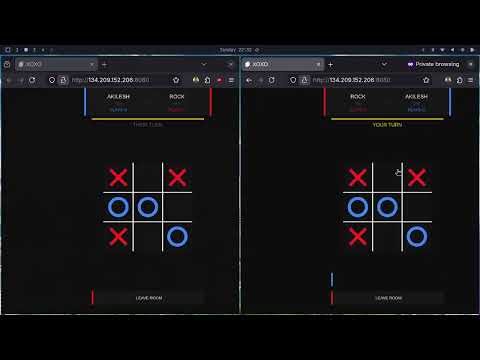
A production-ready, real-time multiplayer Tic-Tac-Toe game built with a server-authoritative architecture using Nakama as the game backend and Phaser 3 as the frontend.
Table of Contents
- Architecture
- Features
- Project Structure
- Local Development Setup
- Deployment
- API & Server Configuration
- Testing Multiplayer Functionality
Architecture
┌─────────────────────────────┐       WebSocket / HTTP
│  Browser (Phaser 3 client)  │ ◄────────────────────────►  ┌──────────────────┐
│  xoxo-phaserjs/             │                              │  Nakama Server   │
│  • MainMenu scene           │                              │  (Go plugin)     │
│  • InGame scene             │                              │                  │
│    ├── Turn timer countdown │                              │  Match Handler   │
│    └── Post-game leaderboard│                              │  • Move validation│
└─────────────────────────────┘                              │  • Win detection  │
                                                             │  • Turn timers    │
                                                             │  • AI integration │
                                                             │                  │
                                                             │  RPCs            │
                                                             │  • find_match    │
                                                             │  • get_leaderboard│
                                                             │  • rewards       │
                                                             └────────┬─────────┘
                                                                      │
                                                             ┌────────▼─────────┐
                                                             │   PostgreSQL     │
                                                             │  • Match state   │
                                                             │  • Player stats  │
                                                             │  • Leaderboard   │
                                                             └──────────────────┘
                                                                      │
                                                             ┌────────▼─────────┐
                                                             │ TensorFlow Serving│
                                                             │  • AI move model  │
                                                             └──────────────────┘
Design Decisions
| Concern | Decision | Reason |
|---|---|---|
| Game state authority | 100% server-side (Go match handler) | Prevents cheating; all moves validated before broadcast |
| Matchmaking | Label-based match listing + on-demand creation | Simple, scalable; no separate queue service needed |
| Concurrent games | Nakama's built-in isolated match rooms | Each match has independent state, presences, and message queues |
| Leaderboard | Nakama native leaderboard API + Storage for streaks | Atomic, consistent; no custom ranking code |
| Turn timer | Server tick-based deadline (Unix timestamp) | Client countdown is display-only; server enforces forfeit |
| AI opponent | TensorFlow Serving model | Decoupled inference; can swap model without touching game logic |
| Frontend config | window.NAKAMA_* globals set by nginx envsubst |
Zero-rebuild deployment — only the config file changes between environments |
Features
Core
- Server-authoritative game logic — moves validated, board managed, win/draw detected entirely on the server
- Automatic matchmaking — finds an open match or creates one; supports fast (10s) and normal (20s) turn modes
- Graceful disconnection handling — opponent-left notification + option to continue with AI
- Concurrent game support — unlimited isolated match rooms, proper room closure when empty
Bonus
- Leaderboard system — wins, losses, win streak, best streak persisted per player; global top-10 ranking displayed after each game
- Timer-based game mode — live countdown in the UI; server auto-forfeits the idle player
- AI opponent (TensorFlow Serving) — invite AI to replace a disconnected opponent mid-game
Project Structure
lila/
├── nakama-project-template/   ← Nakama Go plugin (backend)
│   ├── main.go                  Module init, RPC & match registration
│   ├── match_handler.go         Server-authoritative game loop
│   ├── match_rpc.go             find_match + get_leaderboard RPCs
│   ├── leaderboard.go           Stats persistence & leaderboard updates
│   ├── ai.go                    TensorFlow Serving AI integration
│   ├── daily_rewards.go         Daily reward RPC
│   ├── session_events.go        Single-device session enforcement
│   ├── api/xoxoapi.proto        Protobuf message definitions
│   ├── docker-compose.yml       Local dev stack
│   └── Dockerfile               Plugin builder image
│
├── xoxo-phaserjs/             ← Phaser 3 frontend
│   ├── src/
│   │   ├── nakama.js            Nakama JS client singleton
│   │   ├── config.js            Canvas dimensions
│   │   └── scenes/
│   │       ├── MainMenu.js      Mode select + matchmaking trigger
│   │       ├── InGame.js        Board, timer, leaderboard display
│   │       └── Matchmaking.js   Loading screen
│   ├── public/
│   │   ├── nakama-config.js     Runtime config (overwritten in prod)
│   │   └── index.html
│   ├── nakama-config.js.template  envsubst template for production
│   ├── nginx.conf               nginx server block
│   ├── docker-entrypoint.sh     Renders template → starts nginx
│   └── Dockerfile               Multi-stage: node build → nginx serve
│
├── docker-compose.prod.yml    ← Full production stack
├── .env.example               ← Environment variable template
└── README.md
Local Development Setup
Prerequisites
- Docker & Docker Compose
- Node.js 20+ (frontend dev server only)
1. Start the backend stack
cd nakama-project-template
docker compose up --build
This starts:
- PostgreSQL on port
5432 - TensorFlow Serving (AI model) on port
8501(internal) - Nakama on ports
7349(socket),7350(HTTP/API),7351(gRPC)
Nakama Console: http://localhost:7351
2. Start the frontend dev server
cd xoxo-phaserjs
npm install
npm run dev
Open http://localhost:5000 (or the port shown).
The default public/nakama-config.js points to localhost:7350 — no changes needed for local dev.
Deployment
Prerequisites on the server
- Docker & Docker Compose v2
- Ports
80,7349,7350,7351open in the firewall
Step-by-step
# 1. Clone the repository
git clone <your-repo-url> xoxo && cd xoxo

# 2. Create your .env file
cp .env.example .env
# Edit .env — set POSTGRES_PASSWORD and NAKAMA_HOST (your server's public IP/domain)
nano .env

# 3. Build & start all services
docker compose -f docker-compose.prod.yml up -d --build

# 4. Verify everything is healthy
docker compose -f docker-compose.prod.yml ps
The frontend is now served at http://<your-server-ip>/.
The Nakama API is at http://<your-server-ip>:7350/.
Environment Variables
| Variable | Default | Description |
|---|---|---|
NAKAMA_HOST |
(required) | Public IP or domain that browsers connect to |
NAKAMA_PORT |
7350 |
Nakama HTTP/WebSocket port |
NAKAMA_USE_SSL |
false |
Set true when using a TLS reverse proxy |
NAKAMA_SERVER_KEY |
defaultkey |
Nakama server key — change in production |
POSTGRES_PASSWORD |
(required) | PostgreSQL password |
POSTGRES_DB |
nakama |
PostgreSQL database name |
POSTGRES_USER |
postgres |
PostgreSQL user |
Optional: TLS with Caddy
Put Caddy in front of both services for automatic HTTPS:
your-domain.com {
    reverse_proxy frontend:80
}

nakama.your-domain.com {
    reverse_proxy nakama:7350
}
Then set NAKAMA_HOST=nakama.your-domain.com, NAKAMA_PORT=443, NAKAMA_USE_SSL=true.
API & Server Configuration
Nakama RPCs
| RPC ID | Description | Request | Response |
|---|---|---|---|
find_match |
Find or create a match | { fast: bool, ai: bool } |
{ matchIds: [string] } |
get_leaderboard |
Top-10 global leaderboard | {} |
{ records: [LeaderboardEntry] } |
rewards |
Claim daily reward | {} |
wallet update |
Match Opcodes (WebSocket)
| OpCode | Direction | Description |
|---|---|---|
1 (START) |
Server → Client | New game round; includes board, mark assignments, first deadline |
2 (UPDATE) |
Server → Client | Board after a valid move; includes new deadline |
3 (DONE) |
Server → Client | Game over; includes winner mark and positions |
4 (MOVE) |
Client → Server | Player's chosen position (0–8) |
5 (REJECTED) |
Server → Client | Move was invalid |
6 (OPPONENT_LEFT) |
Server → Client | The other player disconnected |
7 (INVITE_AI) |
Client → Server | Replace disconnected opponent with AI |
Turn Timer
- Normal mode: 20 seconds per turn
- Fast mode: 10 seconds per turn
- Server sends a Unix
deadlinetimestamp with every START and UPDATE message - When the deadline passes the server immediately forfeits the idle player and broadcasts DONE
Leaderboard
Backed by Nakama's native leaderboard (ttt_leaderboard):
- Score = total wins (incremented; ranked descending)
- Subscore = current win streak
Per-player stats (wins, losses, win_streak, best_streak) are additionally stored in Nakama Storage under collection player_stats / key stats for retrieval without leaderboard limitations.
Nakama Server Config (local.yml)
logger:
  level: "DEBUG"       # Change to "warn" in production
session:
  token_expiry_sec: 7200
socket:
  max_message_size_bytes: 4096
Testing Multiplayer Functionality
Two-browser test (quickest)
- Open http://localhost:5000 in Browser A → click Find match.
- Open http://localhost:5000 in Browser B (or a private window) → click Find match.
- Both browsers join the same match. Take turns clicking board cells.
Why does this work? Each browser gets its own device ID (UUID stored in
localStorage), so Nakama treats them as different users.
Verifying server authority
- Open DevTools in one browser and attempt to inject a fake move via the console:
If it is not your turn, the server responds with OpCodeNakama.socket.sendMatchState(Nakama.matchID, 4, JSON.stringify({position: 0}))5(REJECTED) — the board does not change.
Testing timer forfeit
- Start a match between two browsers.
- Leave one browser idle. After the turn time (10s fast / 20s normal) the server sends a DONE message to both clients declaring the active player the winner.
Testing the leaderboard
- Complete a few games.
- After each DONE event the leaderboard panel renders automatically in-game.
- Call the RPC directly from the console:
(await Nakama.getLeaderboard()).forEach(r => console.log(r))
Nakama Console
Access the server admin panel at http://localhost:7351 (local) or port 7351 on your server.
- Matches tab — view live match IDs and player presences
- Storage tab — inspect
player_statsrecords - Leaderboard tab — browse
ttt_leaderboardrecords
