

Svelte Streamdown
Svelte port of Vercel Streamdown for rendering AI-generated markdown with streaming-friendly parsing, hardened HTML handling, extensible plugins, and Svelte-native customization hooks.
The published package name is streamdown-svelte. Thanks to the earlier svelte-streamdown groundwork - this repository continues building on that foundation.
Docs and playground live at https://streamdown-svelte.pacificstudio.ai.
Installation
pnpm add streamdown-svelte
Quick Start
<script lang="ts">
    import { Streamdown } from 'streamdown-svelte';

    let content = `# Hello

Streamdown renders **markdown**, tables, alerts, footnotes, citations, and more.`;
</script>

<Streamdown {content} />
Consumer Setup
Tailwind v4 / SvelteKit
If your app uses Tailwind v4, add Streamdown's published files as a source so Tailwind keeps the package's utility classes in the final CSS. In a SvelteKit app that keeps its main stylesheet at src/app.css:
@import 'tailwindcss';
@source "../node_modules/streamdown-svelte/dist/**/*.{js,svelte,ts}";
If your stylesheet lives elsewhere, adjust the relative path from that file to node_modules/streamdown-svelte/dist. Without @source, built-in code blocks, tables, alerts, and theme classes can render unstyled in production builds.
Shiki themes
shikiTheme controls the active built-in Shiki theme. shikiThemes is the registration map for custom theme names when you want to switch between imported themes by string.
Use a single bundled theme name when one theme is enough:
<Streamdown {content} shikiTheme="github-dark" />
Use a light/dark tuple when your app already toggles .dark, [data-theme='dark'], or color-scheme: dark on <html> / <body> and you want Streamdown to follow that mode automatically:
<Streamdown {content} shikiTheme={['github-light', 'github-dark']} />
You can also pass imported Shiki theme objects directly:
<script lang="ts">
    import { Streamdown } from 'streamdown-svelte';
    import vitesseDark from '@shikijs/themes/vitesse-dark';
    import vitesseLight from '@shikijs/themes/vitesse-light';

    let content = '```ts\nconsole.log(\"hi\");\n```';
</script>

<Streamdown {content} shikiTheme={[vitesseLight, vitesseDark]} />
When you want to switch custom themes by name at runtime, register them once with shikiThemes and then update shikiTheme reactively:
<script lang="ts">
    import { Streamdown } from 'streamdown-svelte';
    import vitesseDark from '@shikijs/themes/vitesse-dark';
    import vitesseLight from '@shikijs/themes/vitesse-light';

    let content = '```ts\nconsole.log(\"hi\");\n```';
    let isDark = false;

    const shikiThemes = {
        'vitesse-light': vitesseLight,
        'vitesse-dark': vitesseDark
    };
</script>

<button type="button" onclick={() => (isDark = !isDark)}> Toggle code theme </button>

<Streamdown {content} shikiTheme={isDark ? 'vitesse-dark' : 'vitesse-light'} {shikiThemes} />
There is no shikiPreloadThemes prop in the current API. Theme switching is supported by updating shikiTheme, and custom theme registrations should be passed through shikiThemes or directly inside the shikiTheme tuple.
If you pass a custom plugins.code, its getThemes() result becomes the active code-block theme source instead of shikiTheme.
Math and Mermaid
Math and Mermaid are opt-in plugins. The minimal consumer setup is:
<script lang="ts">
    import { Streamdown, createMathPlugin, createMermaidPlugin } from 'streamdown-svelte';

    let content = `
$$E = mc^2$$

\`\`\`mermaid
graph TD
  A --> B
\`\`\`
`;

    const plugins = {
        math: createMathPlugin(),
        mermaid: createMermaidPlugin()
    };
</script>

<Streamdown {content} {plugins} />
Streamdown's built-in math component imports the default KaTeX stylesheet for rendered math. Without plugins.math, math falls back to plain text. Without plugins.mermaid, Mermaid fences fall back to code-style output.
What Ships Today
- Streaming and static rendering modes
- Incomplete-markdown repair for streaming content
- Streaming parse caching for block splits and per-block lexing
- Hardened link, image, and raw HTML handling
- Built-in code block rendering with syntax highlighting, copy, and download controls
- Tables, alerts, footnotes, description lists, sub/sup text, and inline citations
- MDX-style component tags and custom marked extensions
- Snippet- and component-based rendering overrides
- Theme, icon, translation, and control customization
Streaming Performance
streamdown-svelte now keeps a parser cache around the active markdown stream. During streaming updates it reuses the latest document split and memoizes lexed results for stable block content, while the actively changing tail block stays transient so the cache does not grow without bound across token-by-token updates.
This closes the markdown parse-caching gap raised in beynar/svelte-streamdown#18. The remaining accepted performance drift versus the React reference is narrower: React-specific memo comparators and deferred-render internals are still framework-specific and documented separately in docs/parity-matrix.md.
Harness Engineering
This repository is developed with OpenASE driving Codex through a Harness Engineering workflow. The core idea is simple: define the hard boundaries first, then let implementation move fast inside those boundaries.
For streamdown-svelte, that means OpenASE is used to orchestrate Codex against validation-first harnesses around parser parity, API surface contracts, browser rendering parity, and end-to-end streaming and non-streaming behavior. Once those harnesses are in place, Codex can move quickly across parser fixes, rendering details, package boundaries, and interaction polish without drifting away from the expected observable behavior.
In practice, the harness comes before the speed:
- acceptance criteria are written down as executable contracts
- rendering behavior is pinned with browser and Playwright coverage
- streaming and settled-document behavior are both tested explicitly
- package/export boundaries are verified separately from UI behavior
That setup is what lets the project iterate quickly while still closing parity gaps in a controlled way.
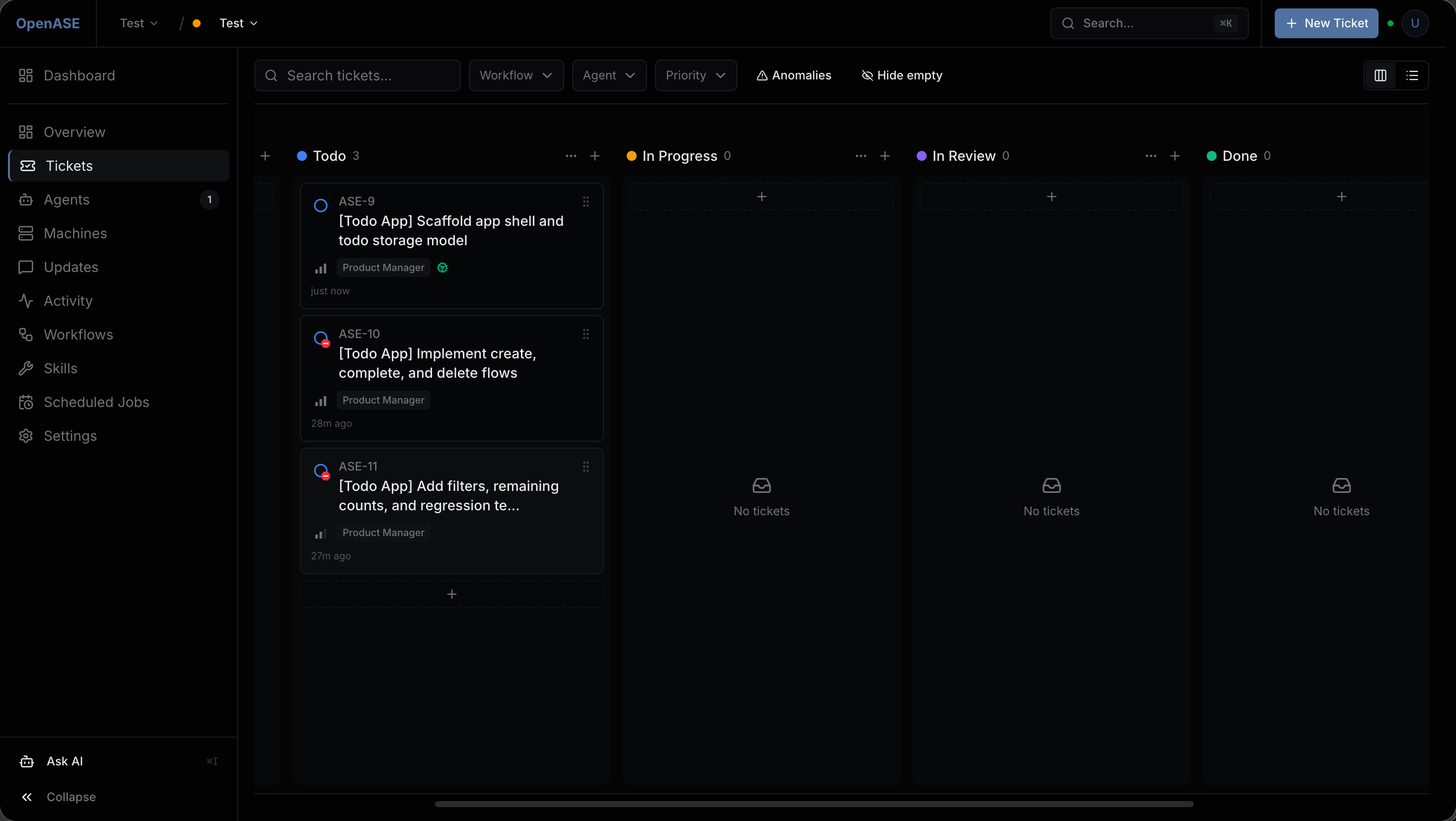
OpenASE drives Codex through ticket-based execution while the harness keeps the engineering boundary explicit.
| Harness layer | What it locks down | Why it matters | Main validation entrypoints |
|---|---|---|---|
| API surface harness | Root exports, subpath exports, public types, package boundaries | Prevents accidental drift while refactoring internals or splitting packages | pnpm verify:api-surface, tests/contracts/api-surface.spec.ts |
| Parser harness | Block splitting, incomplete-markdown repair, normalized parser IR | Keeps streaming repair and final parsing behavior aligned with the reference contract | tests/contracts/parser-parity.spec.ts, tests/ported/remend/*, tests/ported/streamdown/parser/* |
| Rendering harness | Observable DOM structure for markdown, tables, code, citations, and embeds | Ensures UI work stays parity-first instead of becoming framework-specific guesswork | tests/playwright/parity/rendering.spec.ts, tests/ported/streamdown/rendering/* |
| Streaming harness | Token-by-token updates, incomplete fences, caret, animations, stable-block reuse | Verifies the chat-style experience instead of only final static output | tests/playwright/parity/streaming.spec.ts, tests/ported/streamdown/interactions/streaming-updates.svelte.test.ts |
| Non-streaming harness | Settled final output, static rendering, CommonMark/GFM expectations | Keeps the library reliable for normal markdown rendering, not just live streams | tests/playwright/commonmark/parity.spec.ts, tests/ported/streamdown/rendering/final-coverage.svelte.test.ts |
| Interaction harness | Copy/download/fullscreen controls, link safety, Mermaid and table UX | Protects user-facing behavior that is easy to regress during visual refactors | tests/ported/streamdown/interactivity/*, tests/playwright/parity/interactions.spec.ts, tests/playwright/parity/style-probes.spec.ts |
| Parallel execution harness | Explicit docs for accepted drift, migration state, and remaining gaps | Lets multiple agents move quickly on different slices without redefining "done" each time | docs/parity-contract.md, docs/test-migration-status.md, docs/parity-matrix.md |
Rich Rendering Plugins
Code blocks work out of the box. Math, Mermaid, custom code-fence renderers, and CJK autolink fixes are enabled through the plugins prop.
<script lang="ts">
    import {
        Streamdown,
        createCodePlugin,
        createMathPlugin,
        createMermaidPlugin
    } from 'streamdown-svelte';

    let content = `
\`\`\`ts
console.log('highlighted');
\`\`\`

$$E = mc^2$$

\`\`\`mermaid
graph TD
  A --> B
\`\`\`
`;

    const plugins = {
        code: createCodePlugin(),
        math: createMathPlugin(),
        mermaid: createMermaidPlugin()
    };
</script>

<Streamdown {content} {plugins} />
Without plugins.math, math falls back to plain text. Without plugins.mermaid, Mermaid fences fall back to code-style output.
Security and HTML
Raw HTML is processed through Streamdown's security layer. You can allow specific tags, keep literal content for specific tags, restrict link and image destinations, or disable HTML rendering for HTML-like blocks entirely.
<script lang="ts">
import { Streamdown } from 'streamdown-svelte';
let content = `
[Docs](https://example.com/docs)

<Callout>safe custom tag</Callout>
`;
</script>
<Streamdown
{content}
allowedLinkPrefixes={['https://example.com']}
allowedImagePrefixes={['https://cdn.example.com']}
allowedTags={{
callout: ['class']
}}
literalTagContent={['script', 'style']}
/>
Use allowedElements, disallowedElements, or allowElement to filter parsed markdown nodes before render. Set unwrapDisallowed to keep a filtered node's children in place, skipHtml to drop raw HTML tokens entirely, and urlTransform to rewrite or remove rendered href / src values.
Custom Rendering
Snippets
Use snippets when you want to replace the markup for a markdown token while keeping Streamdown's parsing and traversal.
<script lang="ts">
    import { Streamdown } from 'streamdown-svelte';

    let content = `## Custom heading`;
</script>

<Streamdown {content}>
    {#snippet heading({ token, children })}
        <svelte:element this={`h${token.depth}`} class="font-serif text-balance text-emerald-700">
            {@render children()}
        </svelte:element>
    {/snippet}
</Streamdown>
Shipped snippet keys include heading, paragraph, blockquote, code, codespan, ul, ol, li, table, thead, tbody, tfoot, tr, td, th, image, link, strong, em, del, hr, br, math, alert, mermaid, footnoteRef, footnotePopover, sup, sub, descriptionList, description, descriptionTerm, descriptionDetail, inlineCitation, inlineCitationPreview, inlineCitationContent, inlineCitationPopover, and mdx.
Components
Use components when you want to replace selected built-in Svelte components directly.
<script lang="ts">
    import { Streamdown } from 'streamdown-svelte';
    import InlineCode from './InlineCode.svelte';

    let content = 'Use `pnpm test` to run the suite.';
</script>

<Streamdown
    {content}
    components={{
        inlineCode: InlineCode
    }}
/>
components supports heading tags (h1 through h6), p, a, img, table, inlineCode, code, mermaid, mermaidError, and math.
MDX Components
Uppercase tags in markdown can be rendered with mdxComponents:
<script lang="ts">
    import { Streamdown } from 'streamdown-svelte';
    import Card from './Card.svelte';

    let content = `
<Card title="Hello">
This content is still parsed as **markdown**.
</Card>
`;
</script>

<Streamdown {content} mdxComponents={{ Card }} />
Custom Extensions
Streamdown exposes marked extension hooks through the extensions prop and renders unmatched custom tokens through the children snippet.
<script lang="ts">
    import { Streamdown, type Extension } from 'streamdown-svelte';

    const callout: Extension = {
        name: 'callout',
        level: 'block',
        tokenizer(this, src) {
            const match = src.match(/^:::callout\n([\s\S]*?)\n:::/);
            if (!match) {
                return undefined;
            }

            return {
                type: 'callout',
                raw: match[0],
                tokens: this.lexer.blockTokens(match[1] ?? '')
            };
        }
    };

    let content = `:::callout
Important content
:::`;
</script>

<Streamdown {content} extensions={[callout]}>
    {#snippet children({ token, children })}
        {#if token.type === 'callout'}
            <aside class="rounded-lg border px-4 py-3">
                {@render children()}
            </aside>
        {/if}
    {/snippet}
</Streamdown>
Props
The public StreamdownProps type is exported from the package.
| Prop | Type | Notes |
|---|---|---|
content |
string |
Markdown source to render. |
mode |
'static' | 'streaming' |
Selects streaming repair behavior. |
static |
boolean |
Compatibility alias for forcing static mode. |
parseIncompleteMarkdown |
boolean |
Enables or disables incomplete-markdown repair. |
parseMarkdownIntoBlocksFn |
(markdown: string) => string[] |
Custom block splitter. |
dir |
'auto' | 'ltr' | 'rtl' |
Controls text direction. |
class |
string |
Root wrapper class. |
className |
string |
Alias that is merged with class. |
defaultOrigin |
string |
Base origin for relative URLs. |
allowedLinkPrefixes |
string[] |
Link allowlist. |
allowedImagePrefixes |
string[] |
Image allowlist. |
linkSafety |
LinkSafetyConfig |
Link confirmation hooks and modal renderer. |
allowedTags |
AllowedTags |
Raw HTML tag allowlist. |
allowedElements |
string[] |
Markdown element allowlist, using normalized tag names such as p or h2. |
allowElement |
AllowElement |
Callback for per-element markdown filtering decisions. |
disallowedElements |
string[] |
Markdown element denylist, using normalized tag names such as strong or li. |
literalTagContent |
string[] |
Tags whose inner content should be treated literally. |
normalizeHtmlIndentation |
boolean |
Normalizes indentation before HTML handling. |
renderHtml |
boolean | ((token: Tokens.HTML | Tokens.Tag) => string) |
Controls raw HTML rendering. |
skipHtml |
boolean |
Drops raw HTML tokens before render. |
unwrapDisallowed |
boolean |
Keeps a filtered markdown node's children instead of dropping the full subtree. |
urlTransform |
UrlTransform |
Rewrites or removes rendered URL attributes before link/image hardening. |
sources |
Record<string, any> |
Citation source data. |
inlineCitationsMode |
'list' | 'carousel' |
Citation popover layout. |
plugins |
PluginConfig |
Enables math, Mermaid, CJK, custom renderers, or a custom highlighter contract. |
extensions |
Extension[] |
Custom marked tokenizers. |
components |
StreamdownComponents |
Component overrides for selected rendered elements. |
mdxComponents |
Record<string, Component> |
Component map for uppercase MDX-style tags. |
children |
Snippet |
Fallback renderer for unmatched custom tokens. |
theme |
DeepPartialTheme |
Theme overrides. |
baseTheme |
'tailwind' | 'shadcn' |
Built-in theme base. |
mergeTheme |
boolean |
Merge custom theme with the selected base theme. |
prefix |
string |
Prefixes generated utility classes. |
lineNumbers |
boolean |
Enables line numbers for fenced code blocks when the fence allows them. |
shikiTheme |
string | ThemeRegistration | [string | ThemeRegistration, string | ThemeRegistration] |
Active bundled theme name, imported theme registration, or a [light, dark] tuple. |
shikiLanguages |
LanguageInfo[] |
Extra languages for the built-in highlighter. |
shikiThemes |
Record<string, ThemeRegistration> |
Custom Shiki theme registrations referenced by shikiTheme. |
mermaidConfig |
MermaidConfig |
Mermaid configuration passed to the renderer. |
katexConfig |
KatexOptions | ((inline: boolean) => KatexOptions) |
KaTeX configuration. |
translations |
Partial<StreamdownTranslations> |
UI label overrides. |
controls |
{ code?, mermaid?, table? } |
Enables or disables built-in action controls. |
animation |
{ enabled?, animateOnMount?, type?, duration?, timingFunction?, tokenize? } |
Streaming animation configuration. |
animated |
boolean | AnimateOptions |
Compatibility animation API. |
isAnimating |
boolean |
Tells Streamdown whether content is actively streaming. |
caret |
keyof typeof carets |
Caret glyph shown while streaming. |
onAnimationStart |
() => void |
Called when isAnimating flips on. |
onAnimationEnd |
() => void |
Called when isAnimating flips off. |
streamdown |
StreamdownContext |
Bindable instance of the active context. |
element |
HTMLElement |
Bindable root element reference. |
icons |
{ copy?, download?, fullscreen?, zoomIn?, zoomOut?, fitView?, note?, tip?, warning?, caution?, important?, chevronLeft?, chevronRight?, check? } |
Snippet overrides for built-in icons. |
Public Exports
Root exports include:
StreamdownuseStreamdownnormalizeHtmlIndentationtheme,shadcnTheme,mergeThemelex,parseBlocks,parseIncompleteMarkdown,IncompleteMarkdownParsercreateCodePlugin,createMathPlugin,createMermaidPlugin,createCjkPlugindefaultTranslations,mergeTranslationsbundledLanguagesInfo,createLanguageSetextractTableDataFromElement,tableDataToCSV,tableDataToMarkdown,tableDataToTSV
Subpath exports:
streamdown-svelte/codestreamdown-svelte/mathstreamdown-svelte/mermaidstreamdown-svelte/remend(delegates to the standalone@streamdown-svelte/remendpackage contract)
Development
pnpm install
pnpm build:packages
pnpm check
pnpm test
Benchmarks
Run the compare benchmark to generate a shareable performance report with platform metadata and charts:
pnpm bench:compare
This command runs the local/reference benchmark suite and writes these artifacts under coverage/benchmarks:
compare.json: rawvitest benchoutputcompare-report.md: markdown report with overall summary, suite summary, top improvements, regressions, and full breakdowncompare-report.json: machine-readable summary with platform metadata and computed deltascompare-by-suite.svg: bar chart grouped by benchmark area such asParse Blocks,Remend Parser,Stream Render, andTable Utilitiescompare-by-scenario.svg: bar chart for individual scenarios, sorted by improvement/regression magnitude
The report automatically annotates the benchmark platform so screenshots and pasted results keep their execution context:
- OS / kernel / architecture
- CPU model and logical core count
- total memory
- Node and pnpm versions
- git branch and commit
If you still want the legacy plain-text summary, use:
pnpm bench:compare:raw
Typical compare-report.md output looks like this:
# Benchmark Comparison Report

- Generated: 2026-04-07T10:21:48.181Z
- Source JSON: `coverage/benchmarks/compare.json`
- Platform: linux 6.17.0-14-generic (x64)
- CPU: Intel(R) Core(TM) Ultra 9 285K | 24 logical cores
- Memory: 188.1 GiB
- Runtime: Node v22.22.1 | pnpm 10.32.1
- Git: `master` @ `07c8980`

## Overall

- Pairs: 31
- Local wins: 19
- Reference wins: 12
- Geometric mean throughput: 1.32x (+31.8%)
Example charts from the current workspace snapshot are checked into docs/benchmarks/ so the README can show a stable preview. These numbers are machine-dependent and should be treated as an example, not a canonical baseline.
By Suite
By Scenario
Workspace Baseline
The repository now keeps a pnpm workspace baseline for publishable packages:
- repo root:
svelte-streamdown packages/remend: streaming markdown repair utilities prepared for standalone packing
Shared package conventions live in:
pnpm-workspace.yamlconfig/tsconfig.package.jsonconfig/tsup-package.mjsscripts/lib/publishable-packages.mjs
Validation entrypoints for the workspace split:
pnpm verify:packpnpm verify:exportspnpm verify:workspace-smoke
See docs/workspace-baseline.md for the repo layout, local linking workflow, and packaging rules.
See CONTRIBUTING.md for the regression intake workflow, parity fixture naming convention, and bug-fix PR expectations.
Friendly Link
License
Apache-2.0
