Langlens

LangLens
Node-Level Observability for LangChain and LangGraph.
LangLens is a lightweight visual tracer and debugger designed specifically for LLM-powered applications. It captures detailed execution logs from your agents and chains, allowing you to inspect every LLM call, tool execution, and state transition with precision.
✨ Features
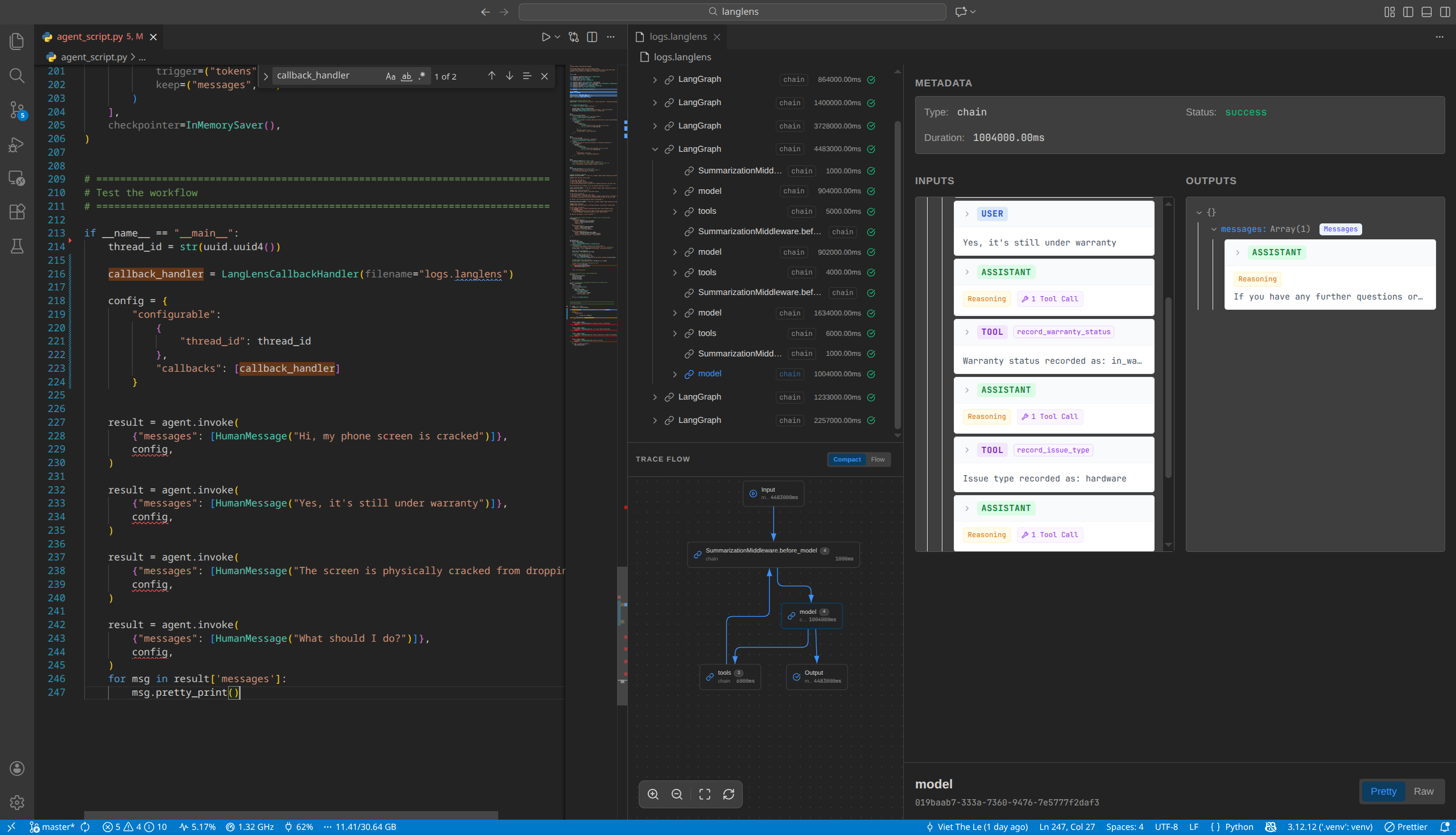
- 🔍 Interactive Trace Viewer: Explore complex workflows through a rich graphical interface.
- 🧩 Node-Level Granularity: Deep dive into individual chain runs, LLM inputs/outputs, and tool executions.
- 💻 VS Code Extension: Debug your traces directly inside VS Code with a custom editor experience.
- 🚀 CLI Tool: Quickly host a local viewer for any
.langlensfile. - 🔌 Seamless Integration: Add observability to your existing projects with a single line of code.
🏗️ How it Works
LangLens bridges the gap between your LLM execution and visual debugging:
graph TD
    subgraph "Capture Phase"
    A[LLM App] -- "1. LangChain Callbacks" --> B(LangLens Handler)
    B -- "2. Stream Events" --> C[[.langlens file]]
    end

    subgraph "Visualization Phase"
    C -- "3a. CLI Server" --> D[Web Browser]
    C -- "3b. Custom Editor" --> E[VS Code IDE]

    D --> F{Interactive UI}
    E --> F

    F -- "4. Inspect Nodes" --> G[Observability & Debugging]
    end
- Capture: The
LangLensCallbackHandlerhooks into LangChain's event system to record starts, ends, and errors of every chain, tool, and LLM call. - Storage: Events are serialized and saved into a
.langlensfile (JSONL format), providing a portable trace of the entire execution. - Visualization:
- The CLI Tool launches a local Python server that hosts a Svelte-based frontend.
- The VS Code Extension registers as a custom editor for
.langlensfiles, embedding the same Svelte UI directly into your workspace.
- Debugging: Use the interactive graph to navigate complex agentic workflows and inspect raw inputs/outputs at any level of the tree.
📦 Installation
Python Package
Install LangLens via pip:
pip install langlens
VS Code Extension
Install the LangLens Viewer from the VS Code Marketplace.
🚀 Quick Start
1. Integrate the Callback
Add the LangLensCallbackHandler to your LangChain or LangGraph execution config.
from langlens import LangLensCallbackHandler
from langchain_openai import ChatOpenAI

# Initialize the handler (creates a logs.langlens file)
handler = LangLensCallbackHandler(filename="logs.langlens")

# Attach it to your run
llm = ChatOpenAI()
config = {"callbacks": [handler]}
response = llm.invoke("How does a sunrise look from Mars?", config=config)
2. Visualize the Trace
Option A: Using the CLI
Run the following command to start a local server and open the viewer in your browser:
langlens visualize logs.langlens
Option B: Using VS Code
Simply open any .langlens file. The LangLens Viewer will automatically render the interactive trace.
🛠️ Development
Local Setup
Build the Web UI: This bundles the Svelte app and copies assets to the Python and VS Code extension folders.
./build_ui.shInstall Python Package (Editable mode):
pip install -e .VS Code Extension:
- Open the
vscode-extensionfolder in VS Code. - Run
pnpm install. - Press
F5to start the Extension Development Host.
- Open the
Packaging
To build distribution packages manually:
./scripts/package.sh
📄 License
This project is licensed under the MIT License.
