
Tinyworld
Tinyworld is a small component-based 2D engine built with Svelte and Canvas2D. It is opinionated, geometric, and intentionally lightweight: scene graphs, runtime component contracts, transform inheritance, rendering, collision, and demo gameplay all live in a compact TypeScript codebase.
This project is not trying to be a general-purpose AAA engine. It is trying to be expressive, hackable, and fun to extend. That said, it's design is heavily influenced by the Unity engine with some semantics borrowed from Unreal.
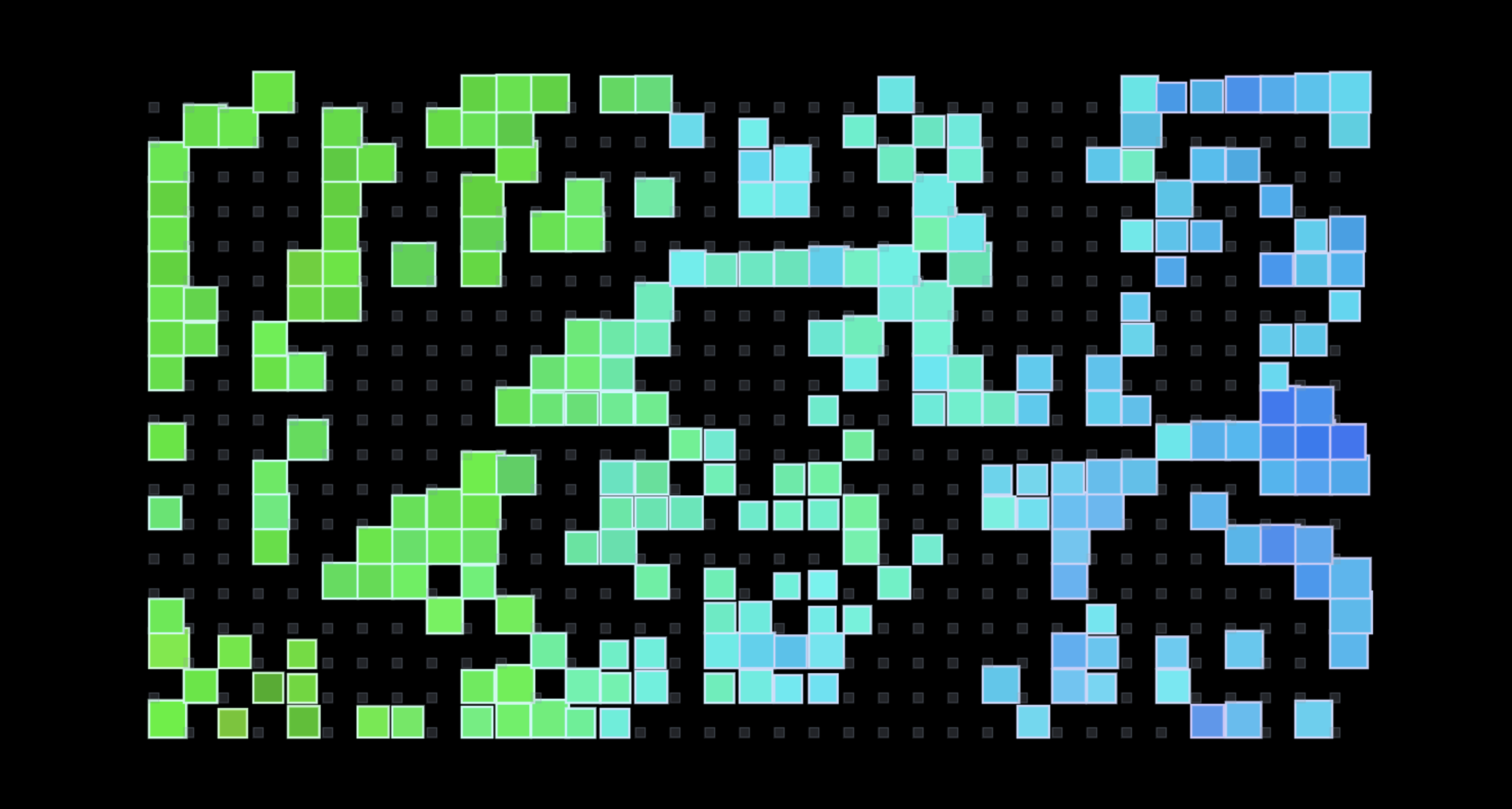 *Exclusive early acces in-game footage of the Game of Life demo - Todd Howard*
Overview
At a high level, Tinyworld is built around a few core ideas:
GameObjectowns identity, child hierarchy, and a bag ofComponents.Components add behavior and data.Transformdefines local motion and derives world motion through the parent chain.Meshdescribes geometry.Rendererdraws geometry.Colliderreasons about geometry and emits collision events.Systems orchestrate world-scale work like rendering and collision passes.Sceneflattens object graphs into a linear runtime view without losing parent-child semantics.Worldowns the main loop, scene switching, and system lifecycle.
So we get things that are composition-first:
Transform + RectangleMesh + RectRenderergives you a visible rectangle.Transform + RectangleMesh + BoxCollidergives you collision geometry.Transform + RectangleMesh + RectRenderer + BoxCollidergives you both.- Child
GameObjects inherit transform state from their parent object.
Philosophy
Tinyworld has a few strong opinions:
- Geometry is a first-class concept. A mesh is not "just rendering data". The same geometry can feed rendering and collision.
- Composition beats inheritance for behavior. There is some gameplay inheritance in the demos, but the engine itself leans on components and systems.
- Runtime contracts matter. Components can declare required sibling components and the engine validates those requirements.
- The render layer should feel declarative. Renderers describe what to draw. The rendering system owns canvas mechanics.
- Small engines should still have taste. Even simple systems like transforms, collisions, and scenes should read cleanly and feel intentional.
Project Structure
Main engine code lives in src/lib/engine.
Important directories:
src/lib/engine/core: engine primitivessrc/lib/engine/instances: concrete component/system implementationssrc/lib/engine/game: gameplay-facing objects and demossrc/lib/engine/scenes: scene builders
Core Architecture
World
World is the runtime root:
- singleton instance
- owns registered scenes
- owns registered systems
- runs the frame loop
- processes start lifecycle for newly registered objects
- supports scene switching
- exposes
reset()so the Svelte app can reboot the engine cleanly during hot reload / remounts
Frame order is:
- process pending object/component starts
- tick
GameObjects - tick active
Components - tick registered
Systems
That ordering matters. It lets gameplay mutate transforms before systems like rendering and collision consume the updated state.
Scene
Scene owns a flattened runtime list of game objects while still respecting hierarchical graphs.
Key responsibilities:
- register spawned graphs
- unregister detached graphs
- maintain id/name/type lookup maps
- track which objects still need
onStart() - expose
SQRY, a small scene query helper
The important design choice here is: the world loop iterates a flat array, but scenes still accept nested parent-child graphs.
GameObject
src/lib/engine/core/game-object.ts
GameObject is the composition container:
- id + name
- child
GameObjects - attached
Components - parent relationship
- activation state
- lifecycle state
Responsibilities include:
- attaching/detaching components
- attaching/detaching child game objects
- validating component requirements
- resolving sibling lookup (
getComponent,find,query, etc.) - enforcing dependency safety on detach
Component
src/lib/engine/core/component.ts
Component is the unit of reusable behavior/data.
It provides:
- lifecycle hooks:
onStart,onTick,onDestroy - parent tracking
- activation state
- guarded
start()/destroy()entry points so the engine can safely manage lifecycle
Decorators and Runtime Requirements
src/lib/engine/core/decorators.ts
The engine supports declarative component dependencies via decorators.
Example:
@RequireComponents([Transform, Mesh])
export abstract class Collider extends Component {}
The decorator stores metadata. GameObject enforces it at runtime when components are attached and when starts are processed.
Components can say what they need, and wiring mistakes fail loudly instead of turning into mysterious
undefinedbehavior later.
Transforms
src/lib/engine/instances/physics/transform.ts
Transform supports:
- local
position,rotation,scale - derived
worldtransform - inherited world transform through parent objects
- local and world direction vectors:
localRightlocalUprightup
This means child objects can be authored relative to their parent, while systems and gameplay can still read fully composed world state.
Geometry and Rendering
Mesh
Meshes are geometry providers. Current concrete meshes include:
RenderingSystem
src/lib/engine/instances/renderers/rendering-system.ts
Rendering is system-owned.
The key abstraction is RenderFrame, a small command buffer for renderer intent.
Renderers do not manually juggle canvas boilerplate. Instead, they describe draw intent:
frame
  .useStyle(this.style)
  .shape((ctx) => {
    ctx.rect(x, y, width, height);
  })
  .fill(...)
  .stroke(...)
  .commit();
Why this design is useful:
- renderers stay focused on geometry
- the rendering system owns canvas state
- save/restore and path lifecycle remain centralized
- future batching or render passes can happen in one place
Important render files:
src/lib/engine/instances/renderers/mesh-renderer.tssrc/lib/engine/instances/renderers/rect-renderer.tssrc/lib/engine/instances/renderers/circle-renderer.ts
Collision and Boundary Resolution
Collision currently lives in:
src/lib/engine/instances/colliders/collider.tssrc/lib/engine/instances/colliders/box-collider.tssrc/lib/engine/instances/physics/collision-system.ts
What exists today:
- box-vs-box overlap detection
- collision enter / leave events
- collider-local event subscription ergonomics
- passive vs active collision behavior
passive: triggersactive: boundary / wall behavior
- basic overlap resolution for active colliders
This is intentionally lightweight. It is not a full physics engine, but it is adjacent.
The current collision model is best understood as:
- broad gameplay collisions and triggers
- kinematic wall blocking
- no rigid-body simulation
- no impulses
- no gravity
Event System
The event system is used for:
- object attach/detach graph registration
- collision enter/leave notifications
This allows engine-level coordination without every subsystem tightly reaching into every other subsystem.
How to Use the Engine
Install dependencies
pnpm install
Start the app
pnpm dev
Type-check the project
pnpm check
Formatting and linting
pnpm format
pnpm lint
How to Build a New Object
The simplest visible object usually looks like:
const go = new GameObject('MyObject', [
  new Transform(new Vec2(100, 100)),
  new RectangleMesh(40, 40),
  new RectRenderer()
]);
If it should collide:
const go = new GameObject('MyWall', [
  new Transform(new Vec2(200, 300)),
  new BoxCollider(40, 40),
  new RectangleMesh(40, 40),
  new RectRenderer()
]);

go.getComponent(BoxCollider)!.collisionBehavior = 'active';
If it should just be a trigger, keep the collider passive.
How to Build a Scene
Create a scene:
const scene = new Scene('main');
Spawn objects:
scene.spawn([player, wall, enemy]);
Register and start it with the world:
const world = World.instance();
world.registerSystems([new CollisionSystem(), new RenderingSystem(canvas)]);
world.addScene(scene);
await world.start('main');
Demos and Scenes
genesis
src/lib/engine/scenes/genetic-life-scene.ts
This is the current editor demo scene.
It builds a cellular automaton board using the engine's regular object/component stack:
- each cell is a
GameObject - each cell has a
Transform,RectangleMesh, andRectRenderer - a board controller advances generations
- births and survival mutate visual genes
Genes currently influence:
- hue
- size
- resilience
- mutation rate
- vitality
The scene reseeds itself when the board stagnates or the population crashes, so it stays visually active.
Gameplay Demo Objects
The repo also contains a handful of interactive/demo objects from earlier engine exploration:
Character: wandering actorFollower: parent-following actorHunter: prey-seeking actorInteractable: static collision/trigger geometryMouseLeader: cursor-driven objectMouseTracker: reusable input component
These are useful examples of how to build gameplay on top of the engine, even when they are not the currently mounted scene.
Architectural Strengths
Things the engine is already especially good at:
- Runtime component contracts
- Transform inheritance through object graphs
- Clean rendering abstraction over Canvas2D
- Easy scene composition
- Collision events with local consumer ergonomics
- Rapid prototyping of new simulations without rewriting the engine
The genetics demo is a good proof point here: a totally different simulation sits on top of the same object model, render layer, and scene runtime.
Limitations and Current Edges
This engine is intentionally small, and some systems are still evolving.
Current limitations:
- collision is box-focused
- wall blocking is kinematic and simple
- there is no full rigid-body physics
- the world is singleton-based, which is convenient but requires reset discipline in app integration
- rendering is Canvas2D only
- some gameplay demo objects are intentionally experimental
These are not flaws so much as current boundaries of the project.
Opinions About the Engine
There are a few strong opinions:
- It prefers clear runtime behavior over "framework magic".
- It values code you can read in one sitting.
- It is okay being specific instead of abstracting prematurely.
- It treats geometry, transforms, and rendering as elegant core primitives instead of incidental plumbing.
Extensions
A few things i'd like to add soon:
- explicit velocity/kinematic movement components
- a dedicated physics system split from collision detection
- richer scene switching / scene transitions
- camera abstraction
- z-order or layered rendering
- per-axis motion solving for walls
- more mesh/collider shapes
- serialization / prefab-like scene authoring
License / Ownership
No explicit license is currently declared in this repository. Add one if you plan to distribute or open-source the engine.
