Openagent







Highlights
- Dual-Agent Architecture — A streaming Chat Agent for replies, and an async Memory Agent that distils long-term context into searchable records.
- Sub-Agent Delegation — The Chat Agent can call
spawn_agentto delegate tasks to nested sub-agents; progress streams in real-time into a sub-conversation shown nested under the parent in the sidebar. - Hybrid Long-Term Memory — SQLite + FTS5 + 384-dim embeddings (fastembed
AllMiniLML6V2) blended with time decay for cross-session recall. - Interactive User Prompts (
ask_user) — The agent can pause mid-task and surface a structured form to the user —text,select,checkbox_group,confirm,date, and more. The agent blocks until the user responds, then continues with the collected values. No more one-shot guessing on ambiguous instructions. - AGUI — Inline Interactive Components — The agent can embed interactive UI components directly in its prose:
File(path: ...)chips that open files in-editor,Url(href: ...)capsules,Chart(type: bar|line|pie, ...)data visualisations, andCard(title: ...)summary panels — all rendered live by the streamdown engine. - MCP-Native — Connect external MCP servers over HTTP or stdio; tools are injected into the agent at call time.
- First-class Dev Tools — Built-in
read_file,write_file,edit_file,glob,grep,terminal_exec, web search (Brave / Tavily / SearXNG), andfetchvia Jina Reader. - Skills System — Drop a
SKILL.mdinto~/.config/openagent/skills/or<workspace>/.agents/skills/and the agent will discover it automatically. - Checkpoints & File-Change Rollback — Every turn is a checkpoint with reverse diffs; undo a single file or rewind the whole agent.
- Pluggable LLMs — Anthropic Claude, OpenAI-compatible APIs, and anything you point a base URL at.
- Observability — Optional Langfuse tracing via OpenTelemetry (
gen_ai.*attributes). - Polished UI — Apple-style design language, streaming markdown, Mermaid & ECharts rendering, light/dark themes, i18n (zh / en).
Quick Start
Prerequisites
| Tool | Version | Notes |
|---|---|---|
| Bun | latest | Package manager — used instead of npm / yarn |
| Rust | 1.70+ | Required for the Tauri backend |
| Node | 18+ | Used by the SvelteKit toolchain |
On Windows the Tauri prerequisites also include WebView2 and the MSVC build tools. See the official Tauri prerequisites for platform-specific setup.
Clone & install
git clone https://github.com/BANG404/openagent.git
cd openagent
bun install
Run in dev mode
# Full Tauri desktop app (frontend + Rust backend)
bun tauri dev

# OR — frontend only (port 14221, no Rust)
bun run dev
Build a distributable
bun tauri build
The built installers / app bundle land in src-tauri/target/release/bundle/.
Configure your first provider
On first launch OpenAgent creates ~/.config/openagent/config.toml. Open Settings → Providers and add a provider, or edit the file directly:
[[providers]]
id = "anthropic-main"
name = "Anthropic"
provider = "anthropic"
api_key = "sk-ant-..."
base_url = "https://api.anthropic.com"
enabled = true

[defaults]
chat_model   = { provider_id = "anthropic-main", model = "claude-sonnet-4-6" }
flash_model  = { provider_id = "anthropic-main", model = "claude-haiku-4-5" }
OpenAI-compatible endpoints (DeepSeek, OpenRouter, local Ollama, etc.) work the same — just point base_url at the right host and set provider = "openai".
Example: write a Skill
Create ~/.config/openagent/skills/python-review/SKILL.md:
---
name: python-review
description: Review Python diffs for type-hint coverage, error handling, and PEP 8 compliance.
---

When asked to review Python code:
1. Check that public functions have type hints.
2. Flag bare `except:` clauses and silent failures.
3. Suggest more idiomatic stdlib alternatives where appropriate.
That's it — OpenAgent picks it up on the next message and lists it in the agent's system prompt. The agent reads the full body on demand via read_file.
Interactive prompts with ask_user
When the agent needs a decision before continuing — ambiguous instruction, technology choice, destructive operation, missing parameter — it calls ask_user to surface a structured form in the chat panel. The agent blocks until you respond; everything in the form is typed, so you can select from dropdowns, tick checkboxes, confirm a boolean, or pick a date without typing a sentence.
Supported field types:
| Type | Use case |
|---|---|
text |
Short free-form input |
textarea |
Multi-line text |
select |
Single choice from a list |
checkbox |
Single on/off toggle |
checkbox_group |
Multiple choices from a list |
date |
Date picker |
confirm |
Yes / No decision |
The agent is guided to ask once, ask clearly, and prefer structured fields over open text boxes.
AGUI — Inline Interactive Components
Beyond markdown, the agent can embed interactive components directly in its responses. The frontend's streamdown renderer picks them up and renders them as rich, clickable elements — no copy-pasting paths or URLs needed.
Syntax: ComponentName(prop: value, prop2: "string")
| Component | Example | Renders as |
|---|---|---|
File |
File(path: "src/tools.rs", lines: "120-140") |
Clickable chip that opens the file at the given lines |
Url |
Url(href: "https://docs.rs/rig", title: "rig docs") |
Capsule that opens the link in the browser |
Chart |
Chart(type: "bar", labels: ["A","B"], data: [10,20]) |
ECharts bar / line / pie chart |
Card |
Card(title: "Recommendation", body: """…""") |
Summary panel; body can nest other components |
Multi-series charts use series: [{name, data}, ...]. The agent uses these by default whenever it references a project file, an external link, or presents comparative data — plain paths and bare URLs are treated as a fallback.
Memory file format
Memory files have two zones. The Memory Agent only writes below the marker comment:
## [User] Personal habits
<!-- You edit freely here; the agent never touches this section -->

## [Agent] Recent context summary
<!-- Memory Agent only operates below this comment -->
- Global memory →
~/.config/openagent/memory.md(every conversation) - Local memory →
<workspace>/.agents/memory.md(workspace-scoped)
Architecture at a glance
┌──────────────────────────────┐        Tauri IPC         ┌──────────────────────────────┐
│   SvelteKit Webview (src/)   │  ◄──────────────────►   │  Rust Core (src-tauri/)       │
│ ── routes/+page.svelte       │  invoke / event          │ ── commands.rs                │
│ ── lib/components/...        │  chat-chunk              │ ── tools.rs · terminal.rs     │
│ ── lib/chatStream.ts         │  chat-tool-call          │ ── conversation_memory.rs     │
│ ── lib/streamdown/...        │  chat-done               │ ── skills.rs · mcp.rs         │
└──────────────────────────────┘                          │ ── checkpoint.rs · state.rs   │
                                                          └──────────────────────────────┘
                                                                       │
                                          ┌────────────────────────────┼────────────────────────────┐
                                          ▼                            ▼                            ▼
                                ┌──────────────────┐         ┌──────────────────┐         ┌──────────────────┐
                                │  SQLite + FTS5   │         │   LLM Providers   │         │   MCP Servers     │
                                │  + fastembed     │         │  Claude · OpenAI  │         │  HTTP · stdio     │
                                └──────────────────┘         └──────────────────┘         └──────────────────┘
See CLAUDE.md for the full module-by-module breakdown.
Project structure
.
├── src/                      # SvelteKit frontend (Svelte 5 · TypeScript)
│   ├── routes/               # Page components
│   └── lib/                  # Components, stores, streamdown, types
├── src-tauri/                # Tauri / Rust backend
│   ├── src/
│   │   ├── lib.rs            # App setup, plugin registration
│   │   ├── commands.rs       # IPC command handlers
│   │   ├── tools.rs          # read_file, write_file, glob, grep, fetch (Jina), websearch, ...
│   │   ├── terminal.rs       # terminal_exec + background sessions
│   │   ├── sub_agent.rs      # spawn_agent tool — nested sub-agent execution
│   │   ├── conversation_memory.rs   # SQLite + fastembed hybrid retrieval
│   │   ├── checkpoint.rs     # Per-turn checkpoints + reverse diffs
│   │   ├── skills.rs         # SKILL.md discovery
│   │   ├── mcp.rs            # MCP transports + tool injection
│   │   └── context.rs        # System prompt assembly
│   └── icons/                # App icons (all platforms)
└── docs/                     # Design specs and architecture notes
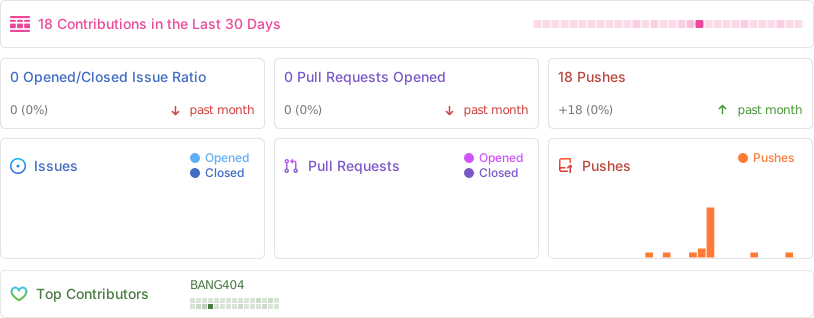
Repository activity
Star history
Contributors
Thanks goes to these wonderful people:
Roadmap
- First-class screenshots & demo GIFs in this README
- Pre-built installers via GitHub Releases (alpha / beta / stable channels)
- In-app skill marketplace
- Multi-window / multi-workspace support
See open issues for the full backlog and feel free to file new ones.
Contributing
Contributions are very welcome — feature ideas, bug fixes, and docs improvements alike.
- Fork the repo and create a branch from
master. - Follow the Conventional Commits style — see existing log for the scopes we use (
feat(toast):,fix(mermaid):,refactor(ui):, etc.). - Run
bun run checkandcargo check --manifest-path src-tauri/Cargo.tomlbefore opening a PR. - Open a PR — describe why, not just what.
Project conventions live in CLAUDE.md; the UI/UX spec lives in docs/design.md.
Observability (optional)
Drop a .env in the project root to enable Langfuse tracing:
LANGFUSE_PUBLIC_KEY=pk-...
LANGFUSE_SECRET_KEY=sk-...
LANGFUSE_HOST=https://cloud.langfuse.com
When keys are present, Chat & Memory agent calls are instrumented with gen_ai.* OpenTelemetry attributes and exported via batch processor.
Further reading
CLAUDE.md— Architecture reference for contributors and agentsCHANGELOG.md— Full release historydocs/design.md— Apple-style design spec- Tauri docs · SvelteKit docs · rig (Rust LLM)
License
Released under the MIT License. © BANG404 and contributors.
